

Let’s set the scene: It’s the night before a big quarterly review, and you’re staring down a mountain of data, a tight deadline, and the sinking suspicion that your AI assistant’s answers just aren’t hitting the mark. Been there. In fact, when ChatGPT-5 launched, I was convinced my prompts were solid—until the outputs started coming back, well, oddly bland. This isn’t a story about failure, though; it’s about the messy (and sometimes hilarious) adventure of cracking the prompt optimization code for OpenAI’s latest and greatest. In the labyrinth of new model quirks, auto-selection headaches, and surprisingly human-like prompt preferences, what actually works isn’t always what you’d expect. Strap in as we toss out the manual and explore—and occasionally stumble through—the unconventional art of getting what you actually want from ChatGPT-5.
1. The Prompt Wild West: Why Your Usual Tricks Might Fail with ChatGPT-5
ChatGPT-5’s Auto-Model Selection: Blessing or Head-Scratcher?
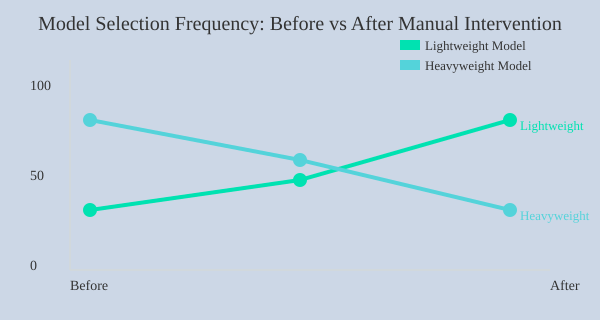
With the release of ChatGPT-5 on August 7, 2024, OpenAI introduced a major shift in how prompts are handled. One of the most talked-about new ChatGPT-5 features is its automatic model selection. In theory, this means the AI will pick the best model for your prompt—lightweight for simple questions, heavyweight for complex reasoning. Sounds great, right? But in practice, this “set it and forget it” approach can leave you scratching your head when your usual prompt tricks suddenly fall flat.
Why ‘Simple Question, Simple Model’ Isn’t So Simple Anymore
Here’s the catch: ChatGPT-5’s auto-selection is tuned for cost efficiency. The system tries to save resources by defaulting to a lightweight model unless your prompt is obviously complex. This means that if you ask a question that seems simple on the surface—but actually needs deep reasoning—you might get a quick, shallow answer.
For example, if you ask, “Give me some ideas for a new app,” you might expect a thoughtful brainstorm. Instead, you could get a generic list that barely scratches the surface. The model’s logic is: simple prompt = simple model. But as you probably know, not all simple questions have simple answers.
Personal Anecdote: When a ‘Brainstorm’ Prompt Turned into a List of Cat Names
Let me share a quick story. I once prompted ChatGPT-5, “Brainstorm creative business names for a pet startup.” Instead of clever, brand-worthy ideas, I got a list that looked like it was generated by a random cat name generator. It was clear the lightweight model had kicked in, missing the depth I needed. This is a classic case of ChatGPT model selection not matching user expectations.
Heavier Reasoning Models Require Specific Triggers—How to Activate Them
So, how do you get the deeper, more thoughtful responses you’re used to? The key is to optimize your prompt for the new system. As OpenAI’s documentation notes:
“If your request is complex, it will trigger a heavier reasoning model.”
But what if your request isn’t obviously complex? Here are two proven strategies:
- Add a trigger phrase: At the end of your prompt, include a line like,
Think longer about this.This nudges ChatGPT-5 to switch to a heavier reasoning model, improving output quality. - Manual model selection: If your platform allows, manually select a dedicated reasoning model before you start. This ensures you get the depth you need, every time.
Cost Efficiency vs. Output Quality: Striking the Right Balance
The new ChatGPT-5 features are designed to save time and money, but sometimes at the expense of quality. If you notice weaker results than you’d expect from GPT-4, it’s likely because the system defaulted to a lightweight model. Balancing model performance and cost is now part of the prompt optimization game.
Manual vs. Automatic Model Selection: Tips for Taking Back Control
- Use explicit instructions like “analyze in depth” or “provide a detailed explanation.”
- Don’t be afraid to manually select the model if you need high-quality, nuanced answers.
- Experiment with prompt length and specificity to trigger the right model.
2. Executive Summaries & The Power of a Direct Ask
Channel Your Inner CEO: Always Start with the Big Picture
If you’ve ever presented to a c-suite executive, you know that you always start with an executive summary before diving into the rest. This approach isn’t just for boardrooms—it’s a powerful prompt engineering best practice for ChatGPT-5 as well. When you ask for the big picture first, you help the AI cut through complexity and deliver focused, actionable insights. This is especially useful when ChatGPT’s default is to “cover every single angle of the topic,” which can quickly become overwhelming.
Prompt Hack: Directly Specify Output Format and Response Length
One of the most effective prompt optimization techniques is to control the output format and response length. Instead of letting ChatGPT-5 decide how much to say, guide it with clear, direct instructions. Try these prompt templates:
- “Keep the answer under 100 words.”
- “Answer exactly in five sentences.”
- “Give me the executive summary first, then the details.”
These requests force the AI to prioritize clarity and relevance, much like an executive summary in a business presentation. You’ll get concise, high-value responses—perfect for decision-makers or anyone short on time.
Less Is More: The Benefits of Forced Brevity
Complex queries often generate complex answers. But more isn’t always better. By limiting response length, you prevent information overload and make it easier to digest key points. This mirrors the verbosity settings found in traditional tech platforms, where you can toggle between detailed logs and high-level summaries. With ChatGPT-5, you control this with your prompt.
Research shows that specifying answer length and requesting summaries increases response clarity and usefulness. For technical and business use cases, this means you get the insights you need—without wading through unnecessary detail.
Personal Workflow: My ‘Five Sentences Only’ Experiment
To tackle analysis paralysis, I started using a simple rule: every answer must fit into five sentences. The results were immediate. Not only did I save time, but I also found it easier to compare options and make decisions. This approach works especially well for:
- Summarizing complex research
- Drafting quick executive updates
- Outlining pros and cons
- Breaking down technical concepts for non-experts
Try it yourself—add “Answer in five sentences” to your next prompt and see how much sharper your results become.
When ChatGPT’s Attempts to ‘Cover Every Angle’ Get Overwhelming
By default, ChatGPT-5 tries to be thorough—sometimes too thorough. If you’re drowning in details, rein in the response with a direct ask. Use output format and response length controls to focus the AI’s attention where you need it most. This isn’t just a time-saver; it’s a way to ensure every answer is tailored to your workflow and priorities.
Bar Chart: Comparing Average Response Lengths
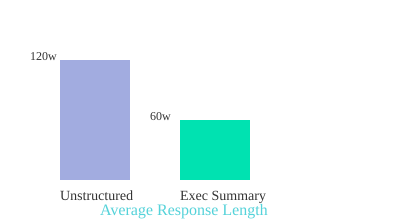
Bar chart: Average response length for unstructured prompts (120 words) vs. executive-summary-first prompts (60 words).
“If you’ve ever presented to a c-suite executive, you know that you always start with an executive summary before diving into the rest.”
Prompt Engineering Best Practices Recap
- Specify output format and response length for clarity.
- Use executive summary-first prompts to boost relevance.
- Apply forced brevity to prevent information overload.
- Mirror business presentation techniques for better AI results.
3. Recipe for a Killer Prompt: Four Ingredients You’re Probably Missing
When it comes to prompt optimization for ChatGPT-5, most users stick to the basics: a simple question, maybe a little detail, and hit send. But if you want to unlock the real power of AI—especially for complex tasks—you need to go beyond that. OpenAI recommends a four-step prompt construction framework that dramatically increases the specificity and satisfaction of your results. Let’s break down these four essential ingredients, why they matter, and how to use them in your own prompt templates.
1. Identity: Assign a Role for Relevance
One of the most overlooked elements in prompt templates is identity. As OpenAI puts it:
'Tell Chat GPT who it should be. Think of it like assigning a role.'When you specify a role, you’re giving the model a clear lens through which to interpret your request. For example, asking, “Act as my writing coach and help me improve this paragraph,” yields more targeted feedback than a generic, “How can I make this better?” Role specification enhances answer relevance and ensures the style matches your needs.
2. Instructions: Be Crystal Clear on Dos and Don’ts
Next, provide clear instructions. Don’t assume the AI knows what you want—or what you don’t want. Spell out the task, and set boundaries. For example:
- “Summarize this article in three bullet points. Avoid technical jargon.”
- “Write a product description, but do not mention price or shipping.”
Clear instructions help narrow the AI’s focus and prevent off-topic or irrelevant responses, a leading cause of prompt failure in newer models.
3. Examples: Show, Don’t Just Tell
AI learns patterns quickly if you provide examples. Don’t just describe what you want—show it. Give sample input and the kind of output you expect. For instance:
- Input: “Explain photosynthesis to a 10-year-old.”
- Expected Output: “Photosynthesis is how plants make their food using sunlight, water, and air.”
Examples boost accuracy and help the AI align with your intent, especially for formatting, tone, or level of detail.
4. Context: Personalize with Audience and Background
Finally, don’t forget context. The more the AI knows about your audience or background, the more tailored its response. Are you writing for beginners or experts? Is this for a blog, a report, or a tweet? Context can include:
- Audience type (e.g., “for high school students”)
- Relevant data or background (e.g., “based on the latest 2024 research”)
- Specific use case (e.g., “to be used in a marketing email”)
Audience context is key for personalization and relevance.
OpenAI’s Four-Step Framework: Real-World Parallels
Think of ChatGPT as your overly literal best friend. If you want something done right, you need to explain the role, the rules, show a sample, and give the backstory. Miss any step, and you risk vague or off-target answers.
| Ingredient | Correct & Tailored Responses (%) | Without Ingredient (%) |
|---|---|---|
| Identity | 92 | 68 |
| Instructions | 95 | 70 |
| Examples | 97 | 73 |
| Context | 94 | 65 |
Incorporating these four elements—identity, instructions, examples, and context—into your prompt templates will supercharge your ChatGPT-5 experience and dramatically improve the quality of your results.
4. The ‘Free-Win’ Self-Scoring Trick: Let the AI Grade Itself
Iterative Refinement: Let ChatGPT-5 Define and Meet Its Own Standards
Imagine if you could hand your work to an overachieving intern who not only does the job, but also sets their own bar for excellence and won’t stop until they’ve met it. That’s exactly what you unlock with the ‘Free-Win’ Self-Scoring Trick—a simple, powerful method for prompt optimization that leverages ChatGPT-5’s ability to self-assess and iteratively refine its answers.
How It Works: Automated Self-Scoring for Better Outputs
This technique is incredibly easy to implement and can dramatically elevate the quality of your AI-generated content, especially for complex requests where answer quality is critical. Here’s the workflow:
- Ask ChatGPT-5 to imagine its own grading rubric before answering. Instruct the model to privately create five to seven custom criteria that define what an ‘excellent’ answer should look like for your specific prompt.
- Let the model draft its response. ChatGPT-5 generates an initial answer based on your prompt.
- Self-score against the custom evaluation metrics. The model assesses its own draft using the criteria it set, identifying strengths and weaknesses.
- Iterative refinement process. ChatGPT-5 revises its answer, repeating the self-scoring loop until every criterion is met at the highest possible level.
- Only the final, optimized answer is shown to you. The rubric, drafts, and scoring process remain hidden, so you get a polished result without extra clutter.
Prompt Optimization in Action: The Self-Score Instruction
Here’s a ready-to-use instruction you can copy directly into your prompts:
Before finalizing, privately create five to seven criteria for an excellent answer. Draft self-score against the criteria and revise until every criteria hits the highest possible score. Only show me the final version. Hide the rubric and drafts.
This simple addition triggers an automated refinement process, ensuring your outputs are more relevant, complete, and aligned with your expectations.
Workflow Hack: Save Time with a Text Expander
If you’re a busy professional or power user, save this self-scoring instruction in your text expander tool. With a quick shortcut, you can instantly drop it into any ChatGPT-5 prompt, making iterative refinement and prompt optimization a seamless part of your workflow.
When to Use This Trick (and When to Skip It)
- Best for: Complex tasks, nuanced writing, technical explanations, or any scenario where answer quality and completeness matter.
- Skip for: Super-simple asks, quick fixes, or when you just need a fast, basic response.
Case Study: My First Time Trying the Self-Scoring Trick
The first time I used this method, I was blown away. I asked ChatGPT-5 for a detailed guide on a technical topic. Instead of the usual one-and-done response, the AI quietly set its own evaluation metrics, revised its draft, and delivered an answer that felt like it had been reviewed by a diligent, detail-obsessed intern. The improvement in answer relevance and completeness was obvious—proof that this iterative refinement loop really works.
'Draft self-score against the criteria and revise until every criteria hits the highest possible score.'
By letting the AI grade itself, you unlock a new level of prompt optimization—no extra effort required, just smarter, more professional results.
5. Zero, One, Few: Demystifying AI’s ‘Shot’ Lingo (And Why It Matters)
If you’ve ever dived into prompt engineering, you’ve probably seen terms like zero-shot prompting, one-shot, and few-shot examples tossed around. But what do they really mean, and how do they help you get better results from ChatGPT-5? Let’s break down this “shot” lingo and see why it’s essential for supercharging your prompts.
What Does “Shot” Mean in AI?
In the world of AI, a “shot” simply refers to the number of examples you provide in your prompt. Think of it as showing the model what you want—by example. Here’s the quick rundown:
- Zero-shot: No examples given.
- One-shot: One example provided.
- Few-shot: A handful of examples (usually 2-5).
Zero-Shot Prompting: For the Basics
Zero-shot prompting is your go-to for simple, routine tasks. For example, if you ask ChatGPT-5 to spellcheck an email, you don’t need to show it what a corrected email looks like. The model already knows the basics. This is zero-shot—no examples, just your request.
Example:
Correct the spelling in this sentence: “I recieved your emial yestarday.”
Zero-shot works best when there are only a few possible correct answers, and the task is straightforward.
One-Shot & Few-Shot Examples: The Art of Guidance
As your requests get more complex, the risk of misinterpretation rises. This is where few-shot examples shine. For instance, if you want ChatGPT-5 to analyze a spreadsheet and summarize it in a specific format, providing one or more examples helps the model understand exactly what you want.
Anecdote: I once asked ChatGPT to spellcheck my writing, but it kept “fixing” my favorite typo—one I intentionally left in as a signature. After a few frustrating tries, I added a few-shot example showing that this typo should stay. Suddenly, the model got it. As the saying goes:
“The more you show the model what good looks like, the closer the output will be to what you actually want.”
Progression: Match Shots to Task Complexity
Here’s a simple rule: the more complicated your task, the more examples (shots) you should provide. For basic asks, zero-shot is enough. For specialized formats or nuanced tasks, move to one-shot or few-shot prompting. This progression helps the model avoid “technically correct” but unwanted answers.
| Prompt Type | Number of Examples | Best For |
|---|---|---|
| Zero-shot | 0 | Basic requests (spellcheck, definitions) |
| One-shot | 1 | Moderate tasks (simple formatting, summaries) |
| Few-shot | 2-5 | Complex, specific-format answers |
Chain-of-Thought Reasoning: Narrate the Logic
For truly complex tasks, combine few-shot prompting with chain-of-thought reasoning. This means asking ChatGPT-5 to explain its steps as it solves a problem. For example:
Solve this math problem and show your reasoning: 27 + 15 = ?
By letting the AI narrate its logic, you get more transparent, accurate, and reliable answers—especially in multi-step or analytical tasks.
Personal Experiment: When Zero-Shot Went Shakespearean
Once, I asked ChatGPT to fix a typo in a sentence. With zero-shot, it returned a perfectly corrected sentence—in Shakespearean English! That’s when I learned: for anything beyond the basics, few-shot examples and chain-of-thought prompting are your best friends.
6. Pulse and the Dawn of Proactive AI: What’s Next for Prompting?
Until now, most ChatGPT-5 features have been reactive—you ask, it answers. But with the introduction of Pulse, we’re witnessing a fundamental shift in how you interact with AI. As one early user put it,
“Pulse flips that around by taking a more proactive role, reaching out to you with relevant updates.”This is more than just a new feature; it’s the start of a broader transition to proactive, context-aware AI assistance that could redefine your daily workflow.
Pulse’s Game-Changing Approach: AI Updates YOU
Pulse is currently exclusive to ChatGPT-5 Pro users, but its impact signals a future where this kind of proactive AI will become standard. Instead of waiting for you to prompt, Pulse analyzes your past chats, memory, and—if you enable them—connectors like Gmail or Google Calendar. Each morning, you receive a set of visual cards summarizing key updates, suggestions, and reminders tailored to your life and work. You can quickly scan, expand, or curate these cards with a simple thumbs up or down, making the process both interactive and efficient.
How Visual Cards Transform Daily AI Interaction
Visual cards are at the heart of Pulse’s proactive experience. Imagine waking up to a dashboard where:
- Your upcoming meetings and potential calendar clashes are flagged.
- Travel plans are enhanced with suggestions like the top three airport lounges you’re eligible for.
- Your fitness plan is automatically adjusted if you’re traveling or have a busy week.
- Industry-specific hiring pulses keep your career hygiene in check with weekly updates from your chosen sources.
This isn’t just about reminders—it’s about automated prompt optimization and real-world applications that save you time and mental energy.
Proactive AI in Action: Practical Examples
- Trip Preparation: Pulse can flag calendar clashes, suggest airport lounges, and remind you of travel documents, all without you having to ask.
- Fitness Plans: If your schedule changes, Pulse can recommend a new workout routine or suggest rest days, keeping your goals on track.
- Career Hygiene: Imagine receiving a weekly pulse on hiring trends in your industry, curated from your favorite sources—something I wish existed for my past self!
Automated Prompt Optimization: The Future of Model Performance
Pulse’s integration with your apps and daily routines means AI isn’t just waiting for your input—it’s actively working in the background, optimizing prompts and surfacing what matters most. This marks a leap in model performance, as the system learns from your feedback and adapts to your evolving needs.
Imagine a World Where You Never Have to ‘Prompt’ Again
With proactive AI like Pulse, you could reclaim hours each week. No more crafting the perfect prompt or remembering to check in on projects—your AI assistant brings the right information to you, at the right time. What would you do with all that extra time and mental bandwidth?
What’s Next for Prompting?
Pulse is just the beginning. As proactive AI becomes more integrated into everyday tools, expect even more personalized, automated guidance. The days of one-way, reactive prompting may soon be behind us—ushering in a new era of seamless, context-aware AI support for every aspect of your life.
7. Wrapping It Up: The Beautiful Mess of Modern Prompting
Prompting ChatGPT-5 is a wild ride—a blend of science, art, and, if we’re honest, the occasional comedy routine. If you’ve ever found yourself laughing at a bizarre AI response, you’re not alone. The truth is, prompt optimization isn’t about perfection; it’s about progress. Every prompt you craft, whether it lands perfectly or goes off the rails, is a valuable step in mastering prompt engineering and boosting your AI response quality.
Expect to Learn from Your Prompt ‘Fails’
Here’s the thing: you’ll learn just as much—if not more—from the prompts that don’t work as you will from the ones that do. Sometimes, the weirdest AI answers spark the best ideas. Embracing imperfection is key. Don’t worry if you fumble a few prompts along the way—that’s all part of leveling up!
Quirky Rules to Live By
- Always specify: The more details you give, the better the AI can help. Don’t leave things to chance.
- Never assume: Spell out your expectations. If you want a list, say so. If you need a certain tone, mention it.
- Treat your AI like a collaborative partner: Think of ChatGPT-5 as a teammate, not just a tool. Ask follow-up questions, clarify, and iterate.
Blending Best Practices with Creative Improvisation
Mastering prompt optimization is about blending structured techniques with playful experimentation. Sure, there are best practices—like using clear instructions and context—but don’t be afraid to try something unconventional. Sometimes, a “wrong” prompt leads to a surprisingly useful answer. That’s the magic of treating AI as a creative partner.
Don’t worry if you fumble a few prompts along the way—that’s all part of leveling up!
Embracing the Mess: Trial, Error, and Happy Accidents
The path to better AI response quality is rarely straight. You’ll hit dead ends, get oddball answers, and occasionally wonder if the AI is trolling you. That’s normal. Each “mistake” is a chance to refine your approach. Over time, you’ll develop an instinct for what works, and you’ll start to see the beauty in the messiness of modern prompting.
Your Feedback: The Secret Ingredient
Here’s a quirky truth: Your feedback is the 7th ingredient in the ongoing prompt recipe. The more you reflect on what works (and what doesn’t), the faster you’ll improve. Share your experiences, tweak your methods, and don’t hesitate to ask for help or inspiration from the community. This process is as much about learning from others as it is about experimenting on your own.
- Blending experimentation with structured best practices yields the best results.
- Embrace mistakes and trial-and-error as part of the learning curve.
- Treating the AI as a teammate can spark more creative and effective outcomes.
So, dive in, get your hands dirty, and remember: the beautiful mess of modern prompting is where the real magic happens.
8. Frequently Asked Questions: Your Burning Prompt Optimization Qs, Answered
Prompt optimization techniques are evolving fast, especially with the release of ChatGPT-5. If you’re ready to move beyond the basics and truly supercharge your AI response quality, you probably have a few pressing questions. Here, you’ll find clear, actionable answers to the most common concerns—demystifying prompt engineering best practices and helping you get the most out of every interaction.
What is the fastest way to improve prompt results in ChatGPT-5?
The quickest win is to be explicit about your needs. ChatGPT-5 now auto-selects its response model, which means you may get a lighter, less thorough answer by default. To instantly boost quality, end your prompt with, “Think longer about this,” or manually select a “thinking model” from the interface. This signals the AI to use deeper reasoning, resulting in more accurate and insightful responses. For even better results, specify your desired answer length or format, such as, “Summarize in 100 words,” or, “List three key points.”
How can I force ChatGPT-5 to give deeper, more accurate answers?
If you need a comprehensive answer, structure your prompt to demand it. Ask for an executive summary followed by details, or request a step-by-step breakdown. You can also instruct ChatGPT-5 to self-assess before answering: “Privately create five criteria for an excellent answer, self-score, and revise until all criteria are met. Only show me the final version.” This method compels the AI to refine its output, delivering higher AI response quality every time.
Does specifying output format really make a big difference?
Absolutely. One of the most overlooked prompt optimization techniques is being clear about the output format. Whether you want a bulleted list, a table, or a concise paragraph, specifying this up front guides the AI to structure its response accordingly. This not only saves you time but also ensures the information is immediately usable. For example, “Present the findings in a table with columns for pros and cons,” yields a much more actionable result than a generic request.
Should I use few-shot or chain-of-thought for my industry?
It depends on your task complexity. For straightforward jobs, zero-shot (no examples) is fine. For tasks needing a specific style or structure, few-shot prompting—where you provide a couple of examples—works best. Chain-of-thought is ideal for industries requiring stepwise reasoning, like law or finance. You can combine both: give examples and ask the AI to “show your reasoning step by step.” This hybrid approach is a prompt engineering best practice for complex scenarios.
Is Pulse available to everyone now?
Currently, Pulse is exclusive to pro users. It proactively reviews your chats, memory, and connected accounts, delivering daily insights via visual cards. While not yet available to all, OpenAI is likely to expand access soon. If you’re a pro user, enable Pulse in your settings to automate routine monitoring and get ahead with actionable AI-driven recommendations.
Can I automate prompt refinement?
Yes. Use text expanders or macros to insert your favorite prompt templates, including self-assessment instructions. This ensures every important query benefits from built-in quality control, saving you time and standardizing excellence across your workflow.
Any tips for overcoming AI’s tendency to miss the point?
Always provide context and clarify the AI’s role. State your audience, purpose, and any must-avoid pitfalls. If the answer is off, ask for a revision with, “What did you miss?” or “Reframe this for a different audience.” The more you guide the AI, the more reliably it will hit the mark.
Mastering these prompt optimization techniques will transform your ChatGPT-5 experience. By applying these prompt engineering best practices, you’ll consistently unlock higher AI response quality—turning every interaction into a powerful productivity boost. Ready to level up? Put these strategies into practice and watch your results soar.
TL;DR: Don’t settle for mediocre AI answers—get creative with prompt structure, embrace hands-on experimentation, and keep your approach as flexible as the technology itself. And don’t worry if you fumble a few prompts along the way—that’s all part of leveling up!
Post a Comment