
I’ll admit it: six months ago, I was borderline overwhelmed by my own to-do lists. Juggling work, fitness, meal plans, and keeping track of my embarrassingly scattered finances had begun to feel like a part-time job. That’s when I decided to throw myself into the artificial intelligence deep end—determined to build a system that could finally help me outsmart my own chaos. It's less about having a robot do my homework and more about creating a sidekick who helps me keep it together. If you’ve ever lost track of priorities or wished you could clone yourself, this experiment in crafting a ChatGPT-powered assistant might just be what you need. (Also: yes, it sometimes feels like living in a sci-fi flick—minus the evil supercomputers, thankfully.)
1. The Accidental Digital COO: How My AI Brain System Began
Imagine this: sticky notes everywhere—on your fridge, your desk, your phone case. Reminders for meetings, grocery lists, half-baked ideas, and, yes, the birthday you still managed to miss. That was me, juggling life’s chaos with a patchwork of analog and digital tools. The tipping point? Missing a close friend’s birthday (despite three reminders). That’s when I realized: I needed a better system, not just more reminders.
From Sticky Notes to a Streamlined AI Brain System
That’s when I dove headfirst into the world of AI Productivity Tools. Over the past few months, I went deep down the AI rabbit hole, experimenting with ChatGPT as my personal assistant. My goal was simple: streamline every category of my life under one digital roof. I wanted a single, always-on “folder” for everything—tasks, health, wealth—accessible from any device, but especially handy on my iPad as a dedicated ChatGPT Assistant.
Trial-and-Error: The Journey to My AI Productivity
Let’s be honest: building an AI Brain System isn’t as easy as flipping a switch. I botched more prompts than I care to admit. Some days, ChatGPT would confuse my gym schedule with my grocery list. Other times, my attempts at Voice Command Tasks ended with “Sorry, I didn’t catch that.” But every mistake taught me something new—how to phrase requests, how to set up dedicated chats for different life categories, and how to iterate until I had a system that actually worked.
Why Treat AI as Your Life COO?
Here’s the philosophy that changed everything: Don’t treat ChatGPT like a fancy notepad—treat it like your digital Chief Operating Officer. Your AI Brain System can do more than just remember things. It can manage your to-do list, prioritize your day, track your health, help with finances, and even suggest ways to optimize your routines. By giving ChatGPT a “seat at the table,” you let it handle the operational details, so you can focus on what matters most.
"I believe that if you implement the steps from today's video into your own life, you could see a t-fold increase in productivity, organization, and enhance your skill sets and knowledge across the board."
Free vs. Paid ChatGPT: What Actually Changes?
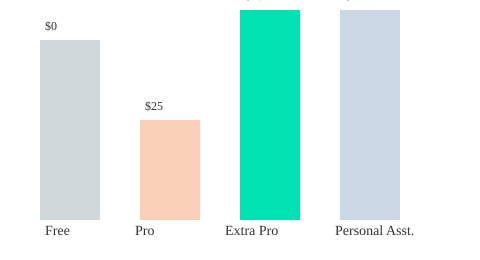
You might wonder: is it worth paying for ChatGPT Pro or Extra Pro? Here’s what I found:
- Free Version: Great for basic tasks, reminders, and simple scheduling. Limited access to advanced features and slower response times during peak hours.
- ChatGPT Pro ($25/month): Faster responses, priority access, and more reliable for complex scheduling, email drafting, and managing multiple life categories.
- Extra Pro (up to $250/month): Best for power users or teams needing advanced integrations and higher usage limits.
A Humorous Tangent: If Only My Fridge Could Talk
If only my fridge could sync with my ChatGPT Assistant about my late-night snack habits, I’d have the ultimate AI Productivity setup. Until then, I’ll settle for ChatGPT reminding me to buy more carrots (and maybe less ice cream).
Key Takeaways
- AI Brain System = all-in-one digital assistant for tasks, health, and wealth
- Dedicated device (like an iPad) keeps your ChatGPT Assistant always ready
- Iterate prompts for best results—trial and error is part of the process
- ChatGPT Pro is a fraction of the cost of a human assistant ($25 vs. $4,000+ per month)
2. Setting Up Your Own AI Life Command Center: The Practical Walkthrough
Step 1: Choose Your Device—Your AI Sidekick
Before you dive into building your ChatGPT Assistant, pick the device that will serve as your command center. While I personally found the iPad to be my productivity sidekick—always on, always ready—you can use your phone, laptop, or even a secondary monitor. The key is accessibility: your AI Brain System should be within arm’s reach, so you can interact with it throughout your day.
| Device | Recommended Use |
|---|---|
| iPad/Tablet | Dedicated AI dashboard, always-on assistant |
| Phone | On-the-go access, quick voice commands |
| Laptop/Desktop | Deep work, multitasking with other productivity tools |
| Secondary Monitor | Persistent AI workspace during work sessions |
Step 2: Name Your First Chat—Start with Purpose
Open ChatGPT and create your first chat. Give it a clear, purposeful name like “AI Command Center” or “Daily Life COO.” This is your main hub, the starting point for all your AI Productivity Tools. Naming your chat helps you mentally anchor its role in your workflow.
Step 3: Organize with Folders—The ‘AI Brain’ Method
Organization is sanity. “I've organized a folder into my AI brain, which essentially has all of the different chats that I use to optimize my life.” Whether you’re a paid or free ChatGPT user, you can mimic this system:
- Pro (Paid) Users: Use ChatGPT’s folder feature to create an “AI Brain” folder. Inside, set up sub-chats for each life vertical: Routine, Fitness, Wealth, Learning, and more.
- Free Users: Use naming conventions (e.g., “AI Brain – Fitness”) to keep chats grouped in your sidebar. It’s not as seamless, but it works.
This folder approach means you’re not dumping everything into one chat. Instead, each area of your life gets its own dedicated space, making information retrieval and task management effortless.
Step 4: Assign Specialized Chats for Each Life Area
Customization is where the magic happens. Research shows that specialized chats for different life areas in ChatGPT increase efficiency. Here’s a simple structure to get you started:
- Main Chat: General tasks, quick notes, daily check-ins
- Routine: Morning/evening routines, reminders
- Fitness: Workout logs, nutrition tracking
- Wealth: Budgeting, investment tracking
- Learning: Book summaries, skill development
Step 5: Supercharge with Voice Command Tasks
Voice commands are a game-changer. They offer speed and reduce friction compared to manual data entry. Most devices support voice-to-text, letting you quickly log new tasks, habits, or ideas without breaking your flow. Pro tip: Set up shortcuts or widgets for instant access to your ChatGPT Assistant, making voice command tasks (almost) frictionless.
Step 6: Build Your Prompt Collection—Your AI’s Secret Sauce
Think of prompts as your AI’s recipe ingredients. But unlike a strict recipe card, they’re more like a trail mix—mix, match, and tweak as you go. Save your favorite prompts in a note or dedicated chat. Regularly refine them based on what works best for your needs. Personalization and experimentation are key to unlocking your AI Brain System’s full potential.
3. Beyond a To-Do List: Productivity, Prioritization & Daily Reflection with ChatGPT
There’s a strange moment when you first hand over your daily task management to a chatbot. At first, it feels like you’re outsourcing your life admin to a robot, and you half-expect to miss something important. But the real surprise? You end up missing out on less. With a ChatGPT Assistant, your reminders, priorities, and even your self-reflection are handled in real time, freeing up mental space and making you more productive than ever.
Voice-to-Task: Dictate, Prioritize, and Track in Real Time
One of the biggest productivity boosts comes from using voice commands. Throughout the day, as new tasks pop up—whether it’s a message on another screen or a sudden idea—you can simply say, “Hey ChatGPT, remind me to write a tweet,” or “Add ‘research stock market’ to my list.” No more typing every single item into a clunky app. Your ChatGPT Assistant captures your tasks instantly, organizes them, and tracks your progress. As you complete tasks, you just log them off:
“As you complete the tasks, you just log them off. Hey, I’ve already taken my dog for a walk. You can mark that off.”
Prompt Specificity: The More You Share, The Better the Results
With AI Productivity Tools like ChatGPT, the details you provide make all the difference. For example, instead of just saying “Research stocks,” you might prompt: “Research the top three tech stocks to watch this quarter, and summarize the key trends.” The more context you give, the more tailored and actionable your results will be. Over time, ChatGPT learns your preferences, making your daily task management smarter and more personalized.
Priority Tables: Sorting Urgent, Important, and Flexible Tasks
ChatGPT excels at sorting your workload by urgency and importance. I use a simple table format to keep everything visible and actionable:
| Task | Priority Level | Due Date |
|---|---|---|
| Create YouTube video | Urgent | Today |
| Walk dog | Important | Today |
| Research stock | Flexible/Other | This week |
Just ask your ChatGPT Assistant to “sort my tasks by urgency,” and it will organize your day, auto-assigning deadlines and highlighting what needs your attention first.
AI Goal Setting & Progress Tracking: Daily and Weekly Planning
Every morning, you can prompt ChatGPT to set up your day based on your priorities. For example: “Here’s my list—please organize by priority and suggest a schedule.” Over days and weeks, ChatGPT tracks your progress, checks off completed tasks, and even reminds you of recurring goals. With consistent use, your assistant adapts to your habits, helping you achieve better results through AI-driven goal setting and accountability.
Reflection & Self-Awareness: End-of-Day Reviews with ChatGPT
Productivity isn’t just about doing more—it’s about doing better. At the end of each day, I ask ChatGPT to guide a quick reflection: “What went well today? What could be improved? Did I meet my goals?” This daily review helps you spot patterns, celebrate wins, and adjust routines for tomorrow. Over time, these personalized reflections lead to real, measurable productivity gains.
With ChatGPT as your daily task manager, planner, and reflection partner, you’re not just ticking off boxes—you’re building a smarter, more intentional life, one prompt at a time.
4. Life Hacks with Voice Commands: Task Logging, Priorities & Instant Feedback
Imagine running your entire day without ever picking up your phone or typing out a single to-do. That’s the magic of Voice Command Tasks with a ChatGPT Assistant. By simply speaking, you can log tasks, set priorities, and get instant feedback—making Daily Task Management more seamless and less intrusive than ever before.
Turning Fleeting Thoughts into Scheduled Tasks
We all have those moments—an idea pops into your head while you’re brushing your teeth, or you remember to send an email while cooking dinner. With voice commands, you can capture these thoughts instantly. Just say, “Add ‘email Sarah about the project’ to my to-do list,” and your AI Productivity assistant logs it right away. No more relying on memory or scrambling for a notepad.
Pro tip: I once tried logging my fitness meal with my voice while mid-bite—maybe finish chewing first! But the point stands: voice commands let you capture tasks in real time, wherever you are.
Snackable Task Management for Big and Small Goals
One of the best parts about using voice for Daily Task Management is how it works for everything—from major projects to tiny reminders. Whether you need to “Schedule annual review” or just “Buy milk,” your ChatGPT Assistant handles both with equal speed. This snackable approach means you’re more likely to log even the smallest tasks, which adds up to improved consistency and fewer forgotten details.
Logging and Updating Tasks on the Fly
Unlike traditional apps, where you have to unlock your phone, find the app, and type, voice commands are instant. Simply say, “Mark ‘walk dog’ as completed,” and your assistant updates your list. This hands-free approach is especially powerful when you’re multitasking or on the go. As one user put it:
"That's even better than a personal assistant 'cause they're not always going to be in the room with you."
Instant Feedback and Live Task Summaries
What makes a ChatGPT Assistant stand out is the immediate feedback. When you complete a task, it’s checked off and reflected in a live summary table. You can ask, “What’s left for today?” and get an up-to-date list, including priorities and due dates. Here’s a sample of how your live tracker might look:
| Task | Priority | Due Date | Status |
|---|---|---|---|
| Walk dog | High | Today | Completed |
| Email Sarah | Medium | Tomorrow | Pending |
| Buy milk | Low | Today | Pending |
Micro-Wins: Quick Task Logging for Consistency
Each time you log a task or mark one as done with your voice, you get a little “micro-win.” These quick victories build momentum and make it easier to stay on top of your goals. Instant task updating encourages you to engage more with your daily goals, making your AI Productivity assistant a true partner in your routine.
Real-World Comparison: Google Tasks vs. ChatGPT Voice Assistant
While Google Tasks is a solid tool, it still requires manual input and navigation. With ChatGPT’s voice integration, you skip those steps. It’s faster, more intuitive, and adapts to your habits over time—learning which tasks you complete quickly and which ones you tend to avoid. The longer you use it, the smarter it gets at helping you prioritize and manage your day.
Laughing Off Voice Recognition Mistakes
Of course, voice recognition isn’t perfect. Sometimes “Call Mom” becomes “Call Tom,” or “Buy milk” turns into “Buy silk.” The key is to laugh it off and correct it—your assistant learns from these moments, too. Over time, it gets better at understanding your voice and preferences, making Voice Command Tasks even more reliable.
5. Tracking Health Like a Biohacker: ChatGPT for Fitness, Food, and Habits
Personal Confession: No Hiding from the Data
Let’s be honest: even the most disciplined among us have those days. I once found myself binge-eating late at night, thinking I could just “forget” to log it. But with my Fitness Tracking AI setup using ChatGPT, there’s no hiding from the data. The next morning, I logged everything—no judgment, just facts. That’s the power of using AI as your health companion: it brings radical honesty and accountability, not shame.
Beyond Generic: Custom Fitness Chats vs. Standard Health Trackers
Most health apps track steps or calories, but they rarely adapt to your unique goals or routines. With a ChatGPT Assistant, you get a fully customizable experience. You can set your own metrics, ask for daily summaries, and even request motivational nudges. This level of personalization means your AI isn’t just a tracker—it’s your coach, logbook, and accountability partner all in one.
Micro-Data Mastery: Logging Calories, Macros, and Weight
- Calories & Macros: Log your meals by typing them in, snapping a photo, or scanning a barcode. As I like to say, “I log my calories in. And it’s very good at estimating food... you can take a photo of your food and it will estimate it for you.”
- Daily Weights: Enter your weight each morning. ChatGPT can chart your progress, spot trends, and even flag rapid changes for review.
- Exercise Routines: Record sets, reps, and times. ChatGPT can summarize your workouts and suggest improvements based on your data.
Wearable Devices AI: Automagic Updates with Apple Watch & Whoop
Manual entry is great, but integration with Wearable Devices AI takes things to the next level. By connecting your Apple Watch or Whoop band, your steps, heart rate, and even sleep data sync automatically. This means your Fitness Tracking AI always has the latest info—no extra effort required. You can ask ChatGPT for a daily health snapshot, and it’ll pull in all your wearable data for a holistic view.
AI Goal Setting: Tracking Progress and Visualizing Results
Set your goals—like dropping from 88kg to 83kg—and let ChatGPT track your journey. Each day, log your weight and calorie balance. The AI calculates your deficit or surplus, helping you adjust your plan in real time. Here’s a sample SVG chart showing weight changes over four weeks, including a spike for that “binge day”:

Habit Formation: Prompts, Nudges, and Daily Reviews
- Prompts: Use refined prompts to review your workouts, get daily summaries, and refine your nutrition plans. Just copy and paste the prompt into ChatGPT—no need to start from scratch.
- Reminders: Let ChatGPT nudge you to hydrate, stretch, or take a walk. These micro-habits add up over time.
- Feedback: Ask for a weekly summary or suggestions for improvement. The AI adapts as your habits evolve.
With Fitness Tracking AI and AI Goal Setting, you get a system that’s always learning, always adapting, and always on your side—no matter what the scale says.
6. AI Money Mentality: Wealth Management & Financial Tracking Without Fancy Spreadsheets
Let’s be honest: I’m still waiting for my AI to tell me “no” on my coffee spending—maybe that’s coming in a future update. But even now, using a Wealth Management AI like ChatGPT as your financial co-pilot is a game-changer. No more wrestling with complicated spreadsheets or expensive software. Instead, you get a simple, conversational way to track your money, set savings goals, and get gentle nudges when you’re about to splurge (again) on that extra-large latte.
ChatGPT Assistant: Your Personal Finance Co-Pilot
Here’s how I set it up: I created a dedicated ChatGPT chat just for finances. This chat is separate from my work and personal life chats, so everything stays organized. I use it to:
- Log income and expenses
- Track investments and savings
- Review recurring costs and spot lazy spending habits
- Prioritize financial goals (like saving for a trip or paying down debt)
Every week, I just copy and paste my latest numbers. ChatGPT responds instantly, summarizing my spending, highlighting trends, and even asking smart questions like, “Did you mean to spend $120 on takeout this week?” It’s like having a proactive assistant who never judges—at least not yet.
Simple Setup, Powerful Results
Getting started is as easy as opening a new chat and pasting in your prompt. For example:
“You are my financial assistant. Each week, I’ll send you my income, expenses, and savings. Help me track my progress, spot trends, and remind me of my goals. Ask questions if you need more info.”
ChatGPT will reply, “Perfect, I’m ready to take on this role and keep you operating at your highest level.” From there, it will prompt you for details, like your typical income, expenses, and savings targets. This keeps you engaged and accountable, without the overwhelm of spreadsheets.
Not a Financial Advisor—But a Great Habit Checker
It’s important to remember: ChatGPT is not a licensed financial advisor. You should always double-check its suggestions, especially for taxes or legal compliance. But as a Wealth Management AI, it excels at catching lazy habits, reminding you of recurring subscriptions, and nudging you to save a little more each month.
Cost Comparison: AI vs. Human Pros
Let’s talk numbers. A personal accountant or assistant can cost hundreds to thousands per month. With ChatGPT Pro, you’re looking at $25/month. As one user put it:
“Honestly, it’s a bargain because a personal assistant would cost four, five, six plus thousand a month. And you’re getting this from $25 to $250 or, of course, you can even use the free version.”
That’s 24/7 access, instant feedback, and no appointment needed—massive cost savings for core household wealth tracking.
Dreaming Bigger: Notion Integration & Zapier Automation
Imagine this: You connect your ChatGPT Assistant to Notion for rich dashboards, or use Zapier Automation to pull transactions from your bank. With a few clicks, you could automate expense logging, get real-time summaries, and even trigger reminders for bill payments. These integrations are already possible and growing, making AI Financial Tracking more powerful every month.
With a dedicated chat, basic tracked categories (income, expenses, savings, investments), and the potential for seamless Notion Integration or Zapier Automation, you can finally manage your money without the spreadsheet headache—and at a fraction of the cost of a human pro.
7. Future Forward: Creative Integrations, Limitations & Learning the Human-AI Dance
Wild Card: When ChatGPT Becomes Your Life Coach
Ever wondered what happens if you ask ChatGPT for life advice? Sometimes, it sounds like your mom—other times, more like your favorite podcast host. The magic (and the risk) is in how you phrase your questions and how much context you provide. As you use AI productivity tools, remember: the more information you give, the more accurate and personalized the responses become. As I’ve learned, “There's a very important thing. After you tell it what you want it to do... it's very important that you get it to ask you questions.” This back-and-forth is where the real learning happens.
Tangent: Dreaming of a Coffee-Making AI
Let’s daydream for a moment—imagine plugging your AI assistant into your coffee maker. You wake up, and your digital COO has already brewed your morning cup, checked your calendar, and summarized your top three priorities. While we’re not quite there yet, the future of wearable devices AI and smart home integrations is closer than you think. Each new device or sensor you connect gives your AI richer data, but it also raises questions about privacy and comfort with automation.
API Integrations: Notion, Zapier, and Wearables—How Far Can You Go?
The real power of your personal AI assistant comes from creative integrations. Notion integration lets you sync tasks, notes, and even daily reflections directly from ChatGPT into your workspace. Zapier automation takes it further, connecting your AI to hundreds of apps—think automatic reminders, meeting scheduling, or even logging your workouts from wearable devices. Here’s what’s possible right now:
- Notion Integration: Seamlessly update databases, track goals, and generate reports.
- Zapier Automation: Trigger actions across apps—send emails, create calendar events, or update spreadsheets.
- Wearable Devices AI: Import health, sleep, and activity data for smarter daily planning.
But there are limits. Current APIs don’t always capture context or nuance. Some automations need manual review, and not every workflow can be fully hands-off.
Reflections: Trust, Oversight, and the Human Touch
How much should you trust your digital COO? AI can handle a lot—reminders, summaries, even suggesting new habits. But it’s not always context-aware or fully personalized. Human oversight is critical. Review the advice, double-check the details, and remember: the human is still the boss (at least for now).
Evolving Prompts: Embracing Imperfection and Lifelong Learning
One of the most powerful lessons is that adapting prompts is a lifelong project. As your goals and routines shift, so should your AI’s instructions. Continual review and adaptation are key—don’t be afraid to tweak your prompts, add new questions, or ask your AI to challenge your assumptions. The more you interact, the more your assistant learns your habits and preferences.
- Encourage your AI to ask you more questions.
- Answer as many as you can—more data means better service.
- Regularly review and update your routines and automations.
Push the limits with integrations, but always keep human oversight in the loop. This is not a set-and-forget system—it's an ongoing, imperfect, and creative dance between you and your digital COO.
8. FAQ: Demystifying Your AI Assistant Journey
Starting your journey with a ChatGPT Assistant can feel overwhelming at first, but with the right guidance, you’ll quickly see how it can transform your daily productivity, organization, and personal growth. Here, I’ll answer the most common questions from new users, drawing on my own experience building an AI-powered life system. Let’s clear up the confusion and set you up for success with AI productivity and Notion integration.
Can I use ChatGPT as a personal assistant for free?
Absolutely. The free version of ChatGPT (sometimes called Chat GBT, chachibbt, or chatbt) is more than capable of handling basic personal assistant tasks—managing to-do lists, tracking habits, and even helping with daily reflections. However, if you want more advanced features like better memory, graphics, tables, and faster responses, the paid Pro or Extra Pro versions are worth considering. For many, the time saved and extra capabilities more than justify the monthly cost, especially compared to hiring a human assistant.
What kind of device do I need for an AI life setup?
You don’t need anything fancy. Any web-enabled device—tablet, phone, laptop, or even an extra monitor—will work as your AI hub. I personally use an iPad that stays on my desk all day, with a dedicated “AI brain” folder for all my ChatGPT chats. For the smoothest workflow, choose a device that supports voice commands, so you can quickly add tasks or ideas without typing. This small change can make a huge difference in your daily efficiency.
Is ChatGPT safe for logging health and financial data?
This is a crucial question. While ChatGPT is a powerful tool for tracking health metrics, finances, and personal reflections, you should always exercise caution. Avoid logging highly sensitive or unencrypted personal information, especially anything you wouldn’t want exposed. Use summaries or anonymized data when possible, and remember that no AI system is completely immune to breaches. For highly confidential matters, stick to secure, dedicated apps or encrypted notes.
How can I automate routines with ChatGPT?
Automation is where your ChatGPT Assistant really shines. By integrating with tools like Notion, Zapier, or your smartwatch (such as Apple Watch or Whoop), you can streamline data entry and task management. For example, you can set up automations that send your daily fitness stats to ChatGPT, or have your financial spreadsheets update automatically. These integrations save time and reduce manual work, letting you focus on higher-level planning and reflection.
What if my prompt isn’t working?
Don’t get discouraged if your first prompt doesn’t deliver the results you want. ChatGPT improves with clear, specific instructions and ongoing feedback. If a prompt falls flat, try rephrasing it, adding more context, or breaking it into smaller steps. Over time, you’ll develop a library of effective prompts tailored to your needs—and your AI assistant will become even more helpful as it learns your preferences.
Does ChatGPT replace personal reflection?
While ChatGPT can guide your daily reflections and help you spot patterns, it’s not a substitute for genuine human introspection. Use your AI assistant as a supportive tool for journaling, gratitude, and self-improvement, but remember to check in with your own thoughts and feelings. The best results come from combining AI insights with your own wisdom and critical thinking.
In conclusion, building your own ChatGPT Assistant is a journey of experimentation and growth. Start simple, stay mindful of privacy, and embrace integrations like Notion for maximum AI productivity. As you refine your system, you’ll discover how much more organized, focused, and empowered you can become. For more tips and advanced prompts, subscribe to the “AI Edge” channel and keep exploring the future of personal AI.
TL;DR: Harnessing ChatGPT as a personal COO can revolutionize your productivity, health, and finances. With voice commands, tailored setups, and a sprinkle of trial and error, you can transform routine chaos into streamlined daily wins.
Post a Comment