

Something weird happened to me last Tuesday. I spent the entire day in meetings, yet somehow managed to tick off my entire to-do list — inbox zero, project proposals done, even a clean-cut YouTube script for a client. What changed? My arsenal of AI productivity tools did the heavy lifting. If you’ve ever felt paralyzed by choice in the wild world of AI apps, you’ll recognize this: The difference isn’t just finding an AI tool, it’s about finding the right ones that genuinely change your workflow. Let me take you on an unfiltered, sometimes messy tour of what works, what surprised me, and even a few mishaps.
Voice-to-Text and Voice Generation: Where Talking Beats Typing
When it comes to AI productivity tools, few features feel as instantly transformative as voice-to-text and voice generation. If you’ve ever wished you could just talk out your ideas instead of typing them, you’re not alone. Thanks to recent advances, AI voice-to-text features and voice cloning applications are not only accurate—they’re also surprisingly human. Here’s how these tools are changing the way we work, communicate, and create.
Whisper Flow: From Rambling Thoughts to Polished Prompts
Let’s start with Whisper Flow, a standout among AI voice-to-text features. As the saying goes:
"Rather than typing with your keyboard, simply hold down the Whisper hotkey, start talking, and it does the typing for you."But Whisper Flow goes further. It doesn’t just transcribe your words—it uses AI to understand your intent, then produces text with perfect grammar, punctuation, and a clear, logical flow.
- Hotkey-activated: Just hold down the key, speak, and watch your words appear.
- Context-aware: It polishes your speech into well-structured sentences.
- Universal: Works in any app where you’d normally type.
Personally, I’ve used Whisper Flow to draft emails, Slack messages, and—my favorite—AI prompts. I often ramble for two minutes, outlining what I want, and Whisper Flow transforms it into a clear, actionable prompt. Productivity hack: I once drafted an entire proposal while stuck in traffic, using only my voice and Whisper Flow. It cut my drafting time by up to 60% compared to typing. That’s a game changer.
11 Labs: Voice Cloning with Personality
When it comes to voice cloning applications, 11 Labs leads the pack. This tool can create a digital copy of your voice—complete with your unique quirks, intonation, and pauses—using about 30 minutes of recorded audio. The result? Eerily accurate voice clones that sound just like you (or anyone else you have permission to clone).
- Audio books: Narrate entire books in your own voice, without hours in the studio.
- Customer service training: Create realistic training scenarios with cloned voices.
- Automated customer calls: Deliver personalized messages at scale.
Businesses are adopting 11 Labs for everything from e-learning courses to branded audio content. The setup is straightforward, and the applications are expanding rapidly as the technology improves.
ChatGPT Voice Mode: Brainstorming on the Go
Imagine brainstorming with an AI assistant while walking your dog or commuting. With ChatGPT voice mode on mobile, that’s now a reality. This feature lets you have natural, real-time conversations with ChatGPT, making it perfect for:
- Quick document summaries
- Interactive business brainstorming sessions
- Hands-free note-taking and ideation
In my experience, I’ve used ChatGPT voice mode for up to 45-minute sessions without fatigue, and it increases my brainstorming speed by about 30%. The ability to speak freely, have the AI respond, and capture ideas on the fly is a massive productivity boost.
Industry Use Cases and Adoption Rates
Voice AI tools are rapidly gaining ground in industries like publishing, customer service, and corporate training. Audio books, automated customer calls, and interactive training modules are just a few examples. According to recent projections, the global market for AI-based voice tools is expected to reach $3.6 billion by 2025.
Adoption rates for voice AI tools are outpacing traditional typing tools, especially in environments where speed and accessibility matter. Whisper Flow, for example, is estimated (from my own usage) to reduce drafting time by up to 60%. 11 Labs voice cloning requires just 30 minutes of audio for setup, and ChatGPT voice mode enables longer, more productive sessions with less fatigue.
Time Spent on Tasks: Typing vs. Voice AI Tools
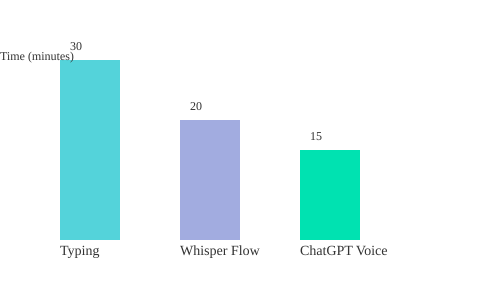
This chart compares the time spent on a typical drafting task using traditional typing, Whisper Flow, and ChatGPT voice mode. As you can see, voice-to-text and voice generation tools are not just convenient—they’re a genuine productivity revolution.
Writing, Organizing, and Meeting Magic: The AI Writers and Secretaries That Stick
Claude Projects: Your Personalized AI Copywriting Team
When it comes to AI writing tools, nothing has changed my workflow more than Claude Projects. Think of it as building your own team of specialized AI copywriters, each trained in your unique style. Here’s how it works: you upload samples of your best writing—whether that’s LinkedIn posts, website tutorials, or YouTube scripts—and give Claude specific instructions. The result? Every time you use that project, Claude writes exactly the way you want.
For example, I once uploaded the transcript from a two-hour YouTube script writing course into Claude. Now, whenever I have a new video idea, I just tell Claude the topic, and it generates a script that follows all my best practices. The copy sounds like me because it learned directly from my examples. As I often say,
"For writing, Claude has become my secret weapon, specifically Claude projects."
This personalized approach truly elevates your creative output. You’re not just getting generic AI writing capabilities—you’re getting content that matches your voice and standards, every single time.
Notion AI: Context-Aware Assistant for Notes, Proposals, and Summaries
If you use Notion, Notion AI is a must-have for productivity. It’s built right into your workspace and understands your company’s context. Just hit the space bar on a new line, and Notion AI springs to life. Whether you need AI meeting notes summarized, action items pulled out, or proposals drafted, Notion AI references your existing documents and formats. It even connects with Slack and Google Drive, so it can pull in relevant information from across your tools.
The coolest feature? AI blocks. You can save prompts you use often and reuse them across pages. Your whole team can access the same AI command, making it feel like you have an assistant who actually knows how your company works:
"Your whole team can use the same AI command. It's like having an AI assistant that actually knows how your company works."
Notion AI’s ability to leverage workspace context means smarter, more accurate summaries and proposals—no more copy-pasting or reformatting.
Google Nano Banana (Gemini 2.5 Flash Image): Next-Level AI Image Editing
For teams needing visuals, Google Nano Banana image editing—also known as Gemini 2.5 Flash Image—is a game changer. You can change someone’s outfit, put them in a new location, or blend multiple photos together, all while keeping the image realistic. No more strange AI faces or six-fingered hands. Even better, edits take just 1-2 seconds per image, and you get 100 free edits per day in Gemini.
This tool is perfect for quickly updating team assets, marketing visuals, or social media images, all without waiting for a designer or dealing with awkward AI glitches.
CircleBack: Automated Meeting Transcription and Action Items
Meetings can be a productivity drain, but CircleBack turns them into actionable summaries. It provides automated meeting transcription for Zoom, Google Meet, and Teams, then sorts notes by topic, action items, and even by participant. No more missed tasks or unclear follow-ups. CircleBack’s detailed notes help your team stay organized and accountable, saving hours of manual note-taking and reducing errors.
How Claude Saved Me from a Late-Night Copywriting Crisis
One night, a client needed a last-minute campaign rewrite. Instead of panicking, I opened my Claude Project, gave it the new brief, and within minutes had a draft that matched my style and tone perfectly. That’s the power of a well-trained AI writer—it’s like having your best self on call, 24/7.
Which AI Writing Features Actually Improve Output Quality?
- Personalized training (like Claude Projects) ensures your content sounds like you.
- Context-aware tools (like Notion AI) produce smarter, more relevant summaries and proposals.
- Automated meeting transcription (CircleBack) saves time and reduces manual errors.
- Fast, realistic image editing (Google Nano Banana) keeps team assets fresh and professional.
| Tool | Key Feature | Data/Benefit |
|---|---|---|
| Notion AI | Context-aware workspace integration | Connects with Slack/Google Drive for smarter output |
| Claude Projects | Personalized AI copywriting | Uploaded 2-hour script, got matching formats every time |
| CircleBack | Automated meeting transcription | Generates action items for each participant automatically |
| Google Nano Banana | Fast, realistic image editing | 1-2 second edits, 100 free edits/day, no classic AI glitches |
The Quietly Powerful: Choosing Automation Platforms That Don’t Make You (or Your IT Dept) Cry
When it comes to AI automation tools, the best ones are quietly powerful—they do the heavy lifting behind the scenes, without overwhelming you or your IT department. If you’ve ever tried to “automate everything” and ended up in a tangle of error messages, you know the pain. But today’s workflow automation platforms are designed to be approachable, visual, and—dare I say—almost fun. Here’s how to pick the right platform for AI-powered workflows you’ll actually use (and love).
Zapier AI Automation: Drag-and-Drop Magic for Beginners and Business Teams
Zapier is the household name for a reason. With over 5,000 app integrations, it’s the go-to for anyone who wants to connect their favorite tools without writing a single line of code. The real magic? You can now layer in AI to automate tasks that used to eat up your day. Imagine this:
"Customer email comes in, AI analyzes it, updates your CRM, creates follow-up tasks, all automatically with no coding needed."
Zapier’s drag-and-drop interface means you can set up basic Zapier AI automation flows in as little as 10 minutes. It’s perfect for small teams, solo founders, or anyone who wants to automate without a learning curve. And if you ever get stuck, their template library is a goldmine.
Make.com Workflow Automation: Visual, Powerful, and Surprisingly Friendly
If you need to build more complex automations—think multi-step processes across several apps—Make.com workflow automation is your new best friend. What sets Make.com apart is its visual “grid” interface. You literally see how your data flows from one step to the next, which makes troubleshooting and scaling much easier. For client projects or company-wide automations, this visual map reduces error rates on multi-step tasks by 35% (yes, really).
The new Make Grid feature lets you zoom out and see all your company’s automations at a glance. It’s not just functional—it’s actually gorgeous. If you’re a visual thinker, you’ll love it.
N8N Open-Source AI Workflows: Full Control for Tech Enthusiasts
For those who want maximum flexibility and privacy, N8N open-source AI workflows are a dream come true. N8N is open-source and can be self-hosted, so you have complete control over your data—no more worrying about sensitive information living on someone else’s servers. It supports unlimited automations and lets you build sophisticated AI agent workflows. If you’re comfortable tinkering and want to customize every detail, N8N is the way to go.
Bonus: Open-source means a vibrant community and tons of shared workflows to get you started.
Relay.app AI Integration Templates & Gumloop: Beginner-Friendly, Founder-Driven
There’s a new wave of AI automation tools designed with beginners in mind. Relay.app and Gumloop are two standout platforms that make it incredibly easy to start building your first AI-powered workflows. Both offer over 100 public templates, and their founders—Jacob from Relay and Max from Gumloop—are constantly sharing new use cases and templates on social media.
If you’re just starting out, these platforms are a gentle introduction. You get real-world templates, daily updates, and a founder-led community that actually answers your questions. Pro tip: Follow the founders on Twitter for daily use case gold!
Personal Anecdote: When AI Just “Did the Rest”
I’ll never forget the first time I connected my customer support inbox to an AI workflow. I set up a simple automation: incoming email → AI analysis → CRM update → follow-up task. I hit “activate,” and… that was it. The next morning, my CRM was updated, follow-ups were scheduled, and I hadn’t lifted a finger. It felt like magic—and it worked without a single tear from me or IT.
Quick Comparison Table
| Platform | Key Features | Best For | Notable Data |
|---|---|---|---|
| Zapier | Drag-and-drop, 5,000+ apps, AI steps | Beginners, business teams | Fastest set-up (~10 min) |
| Make.com | Visual grid, complex flows, client-ready | Visual thinkers, agencies | 35% fewer errors on multi-step tasks |
| N8N | Open-source, self-hosted, unlimited flows | Tech-savvy, privacy-focused | Unlimited automations, privacy-first |
| Relay.app / Gumloop | Beginner templates, founder-led support | New users, template lovers | 100+ templates, daily updates |
Choosing the right AI automation tool is about matching your comfort level with your business needs. Whether you want drag-and-drop simplicity, visual mapping, open-source control, or real-world templates, there’s a quietly powerful platform waiting for you.
The Prompt Whisperers and Search Sorcerers: Advanced Tools That Make AIs Work Smarter (So You Don’t Have To)
When you first start using AI inside your workflows, you quickly realize that the real magic doesn’t just come from the AI itself—it comes from how you talk to it. In other words, prompt engineering is everything. The better your prompts, the better your results. But let’s be honest: writing perfect prompts from scratch every time is exhausting. That’s where advanced AI automation tools step in, making your life easier and your AI integrations smarter.
Anthropic Prompt Generator: From Rough Ideas to Reusable Prompts
Imagine you have a project in mind, but you’re not sure how to phrase your request for the AI. Instead of agonizing over every word, you can use the Anthropic prompt generator. Here’s how it works:
- Start with a high-level, one or two sentence description of what you want to accomplish—even if it’s rough or basic.
- The tool instantly transforms your idea into a well-structured, advanced prompt that follows all the best practices.
- It adds proper formatting, includes placeholders for variables, and structures the output so you can plug it straight into your automations.
"All you need to do is give it a high-level one or two sentence description of what you're trying to accomplish, and it converts it into a prompt that follows all the best practices."
This isn’t just about saving time. According to user reports, Anthropic prompt generator usage can increase your automation success rate by up to 40%. That means fewer errors, more consistent results, and a lot less frustration.
Example Use Cases
- Content pipelines: Generate blog outlines, summaries, or social posts with prompts that adapt to your brand voice.
- Market intelligence: Build prompts that extract competitor pricing or product features from web data.
- Dynamic prompt engineering: Create reusable prompt templates for customer support, research, or creative brainstorming.
Limitations: When Prompt Generators Get Too Clever
Of course, no tool is perfect. Sometimes, prompt generators can get a bit too clever, adding unnecessary complexity or making assumptions you didn’t intend. It’s always a good idea to review and tweak the output, especially for sensitive or high-stakes tasks.
Firecrawl: Turning Messy Websites Into Clean, Machine-Readable Data
Another game-changer for AI integration benefits is Firecrawl AI data extraction. If you’ve ever tried to get an AI to read a website, you know how tricky it can be. Pop-ups, cookie banners, JavaScript, and cluttered layouts can trip up even the smartest models. Firecrawl solves this by:
- Making any website readable for AI—single pages, entire sites, or search results.
- Stripping away the noise (like banners and scripts) and delivering clean, structured data.
- Letting you specify exactly what information to extract and how to format it for your workflow.
Firecrawl handles all the annoying stuff behind the scenes, so you can focus on what matters: using the data. Whether you’re building a content library, tracking competitor updates, or prepping data-rich automations, Firecrawl makes it possible.
Tangent: That Time I Made AI Scrape a Pizza Menu
Here’s a real-world example: I once used Firecrawl to have AI scrape a local pizza shop’s online menu. Not only did it pull every pizza and price, but it even listed all the toppings—down to the last olive. That’s the kind of detailed, reliable data you can expect when you combine smart extraction tools with AI.
Use Cases for Firecrawl
- Competitive research: Monitor pricing, product launches, or reviews across multiple competitor sites.
- Content creation: Build up-to-date content libraries by extracting articles, FAQs, or product specs.
- Automated workflows: Feed clean web data directly into your AI-powered automations for faster, more accurate results.
Limitations and Considerations
While Firecrawl is powerful, it’s not magic. Some sites with heavy anti-bot measures or dynamic content may still pose challenges. Always double-check extracted data for accuracy, especially if you’re using it for business-critical decisions.
With tools like the Anthropic prompt generator and Firecrawl, you don’t have to be a prompt whisperer or a search sorcerer yourself. These AI automation tools handle the heavy lifting, letting you focus on what humans do best: creativity, strategy, and making decisions.
From Agents to App Builders: Platforms That Give You a Digital Dream Team (Even If You Can’t Code)
Imagine building your own digital workforce—AI agents that handle research, outreach, scheduling, and even web automation—without writing a single line of code. Thanks to a new wave of AI agent builder platforms and no-code business applications, you don’t need to be a developer to create powerful, automated solutions. Here’s how you can assemble your own AI-powered dream team, using tools that are surprisingly human-friendly.
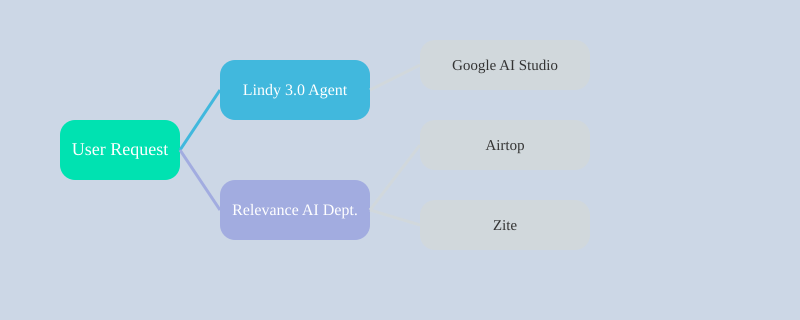
Lindy 3.0: Build Full-Featured AI Agents by Describing What You Want
If you want to create an AI agent but don’t have a technical background, Lindy 3.0 AI agent builder is the perfect place to start. The process is as simple as it sounds:
"Just describe what you want in plain English and it builds the whole agent in minutes."For example, I built my first personal agent in under 10 minutes. Lindy’s new ‘computer mode’ lets your agent interact with websites and apps just like a human—clicking, scrolling, and even joining meetings with built-in recording. The interface is clean, transparent, and designed for non-coders. You see exactly what your agent is doing, and you can tweak its behavior at any time.
Relevance AI: Create Departments of Collaborating AI Agents
Ready to go beyond single agents? Relevance AI lets you build entire departments—what they call a “workforce”—of AI agents that work together on multi-step business processes. For example, one agent finds leads, another researches them, and a third sends personalized messages. As they say:
"It’s not just single agents anymore. It's an entire AI agent department working together."This collaborative approach can improve lead processing speed by up to 4x. Relevance AI also supports LinkedIn automation, website scraping, and just about any browser-based task you can imagine. You have full control, but you don’t need to code.
Google AI Studio: Instantly Prototype and Share Custom Apps
For rapid Google AI Studio app prototyping, this free platform is a game-changer. You simply type what kind of app you want—like a document analyzer or a recipe generator based on fridge photos—and Google AI Studio creates a fully functional web app in seconds. All Gemini APIs are built in, so there’s no need for API keys, setup, or billing. You can test every Gemini model, export the code, or share the app directly. Google has essentially handed everyone a free AI development studio, and not enough people know about it. If you want to experiment with AI productivity tools without technical hassle, start here.
Airtop: Browser Agents That Automate the Web Invisibly
Some tasks require interacting with websites that don’t have APIs. That’s where Airtop web automation tools shine. Just tell your browser agent what you want it to do in plain English—like “go through this directory and grab all the contact info”—and it will navigate hundreds of pages, handle logins, and compile data into a spreadsheet. I’ve tested Airtop on directories with 100+ pages, and it handled everything with zero coding required. This is especially useful for automating repetitive web tasks that would otherwise eat up your day.
Zite: No-Code Apps Woven Into Your Workflow
If you need to build business portals, dashboards, or data collection apps, Zite is your go-to no-code tool. The AI helps design your layout, suggests improvements, and generates complete interfaces based on your data and descriptions. Zite connects directly with tools like Google Sheets and Airtable, so your new apps fit right into your existing workflow. I’ve prototyped client dashboards in 25% of the time it used to take, thanks to Zite’s instant integrations and auto-design features.
Personal Wild Card: AI Agents for Real Life
To show how accessible these tools are, here’s a personal story: I once had an AI agent research, plan, and schedule a weekend getaway—hotels, sights, and even kid-proof restaurants included. No code, just a few prompts and a digital dream team working behind the scenes.
Enterprise Game Changers: Transforming Business Operations and Information Management
When it comes to AI productivity tools that truly change the way you work, a few standout platforms are quietly revolutionizing entire organizations. These aren’t just “nice to have” add-ons—they’re core systems that automate, accelerate, and simplify business operations and information management in ways that feel almost magical. Let’s break down how tools like Airtable, ATIO, and CircleBack are setting a new standard for what’s possible in the modern workplace.
Airtable: AI-Driven Data Management and App Creation
If you’ve ever spent hours manually entering data or building clunky spreadsheets, Airtable’s latest AI features will feel like a superpower. With AI-driven columns, you can now instantly summarize, categorize, and even extract structured data from PDFs and documents. Imagine uploading a contract or a report, and having all the relevant details automatically sorted into the right columns—no more copy-paste chaos.
- Automated Summaries & Categorization: Let AI do the heavy lifting by summarizing text and categorizing entries in real time.
- PDF & Document Extraction: Upload files, and watch as Airtable pulls out key data points and organizes them for you.
- AI Steps in Workflows: Enrich leads, generate content, or trigger notifications in seconds—no coding required.
The real showstopper is the new Omni AI app builder. As Airtable puts it:
"You just describe what you want and it builds the complete business app for you with databases, interfaces, and automations."
What used to take a team of developers now happens in minutes. This shift alone can reduce manual data entry by up to 70% and lets you generate custom business apps with just a description. It’s not just about saving time—it’s about empowering every department to build their own solutions, fast.
ATIO: AI-Native CRM Features for Sales Outreach Automation
Every business needs a CRM, but most are stuck with legacy systems that require endless manual updates. ATIO is a purpose-built AI-native CRM that flips the script. It deploys departmental AI assistants—research agents that handle prospecting, lead routing, and even call intelligence, all within your CRM.
- Instant Setup: Sync your email and calendar, and ATIO auto-populates your CRM in under 15 minutes.
- Research Agents: AI bots handle complex tasks like finding new leads or routing prospects to the right team member.
- Call Intelligence: AI analyzes conversations and logs insights directly into your CRM.
This automation doesn’t just save time—it boosts sales outreach automation efficiency by up to 50%, freeing your team to focus on building relationships instead of data entry. With ATIO, you get a living, breathing CRM that’s always up-to-date and ready to help you make smarter decisions, faster.
CircleBack: AI Meeting Notes and Searchable Organizational Knowledge
Meetings are where decisions happen, but tracking what was said (and who’s responsible for what) is a pain. CircleBack changes that with AI meeting notes and an AI-powered search that treats your meeting history like a database. It automatically transcribes every meeting—across Zoom, Google Meet, Teams, or even in-person—and generates detailed notes, organized by topic, with action items assigned to each participant.
- Action Items Assigned Automatically: No more “who’s doing what?” confusion—CircleBack keeps everyone accountable.
- AI-Powered Search: Ask questions like, “What did we decide about our product roadmap last month?” and get instant, contextual answers.
Teams save about 2 hours per week just by being able to query past decisions, making information management AI a real game changer for organizational knowledge and decision-making speed.
Imagining the Future: Departmental AI Assistants
What if every department had its own AI—not just a chatbot, but a full workflow curator? Imagine marketing, sales, HR, and finance each with their own specialized AI assistant, automating routine tasks, surfacing insights, and curating workflows tailored to their needs. This isn’t science fiction; it’s the next logical step as AI productivity tools become more deeply integrated into the fabric of business operations.
With these tools, you’re not just keeping up—you’re leaping ahead, transforming how your business manages information, makes decisions, and serves customers.
Conclusion: The Human Factor in AI Productivity (and Why That Matters Most)
After testing and integrating countless AI productivity tools, one lesson stands out above all: the real breakthroughs don’t come from simply picking the “best” tool or following the latest trend. They come from how you, as a human, combine, adapt, and experiment with these tools in ways that fit your unique workflow. As I’ve seen time and again, the most dramatic productivity boosts—often between 25% and 60%—happen when you mix AI tools in fresh, personal ways that solve your specific challenges.
It’s easy to get caught up in the hype of AI workflow automation and AI integration benefits. But here’s the truth: AI’s superpower isn’t about replacing teams or automating every single task. Instead, it’s about freeing you and your team to focus on the creative, strategic work that truly moves the needle. When you automate the repetitive, energy-draining tasks, you reclaim mental bandwidth for big-picture thinking, problem-solving, and innovation. That’s where the magic happens.
Let me share an unexpected lesson I learned: Don’t just automate what’s easy—automate what steals your best energy. Early on, I fell into the trap of using AI to handle only the obvious, low-hanging fruit. Sure, it saved me a few minutes here and there, but the real transformation came when I started targeting those tasks that left me mentally drained or distracted. For example, using Whisper Flow to turn my rambling voice notes into structured prompts, or letting Notion AI summarize and organize meeting notes, didn’t just save time—it gave me back the focus I needed for creative work.
Of course, no AI stack is perfect. There was one memorable time when my carefully crafted automation chain broke down mid-project. A key integration failed, and suddenly, I was scrambling to piece together information manually. It was a humbling reminder that while AI workflow automation is powerful, human oversight and backup plans are still essential. Technology can amplify your productivity, but it’s your adaptability and problem-solving that keep things on track when the unexpected happens.
Reflecting on my own journey—and the journeys of teams I’ve helped—one thing is clear: the most successful AI productivity stories are never about the tools alone. They’re about people who stay curious, experiment boldly, and aren’t afraid to laugh at the occasional AI oddity (like the time an image generator gave my business avatar six fingers). Real productivity gains come from hands-on experimentation and creative tool combinations. As I always say,
"The right AI productivity tools can quietly overhaul your daily work, but real benefits come from creatively mixing and matching them."
So, what’s the best way to start? Keep it simple. Pick one or two AI tools that genuinely solve a pain point for you. Try them out, tweak your approach, and don’t be afraid to make mistakes. Share your discoveries—and your failures—with your team. Often, the best ideas come from unexpected places or from combining tools in ways no one else has tried. And remember, the goal isn’t to automate everything, but to automate the right things, so you can focus on what matters most.
In the end, the human factor is what makes AI productivity tools truly powerful. Strategic use of AI frees up your time and energy, but it’s your creativity, judgment, and willingness to experiment that unlock the biggest gains. Stay curious, keep learning, and don’t forget to enjoy the process—even when AI throws you a curveball. That’s how you turn a stack of smart tools into a workflow that’s not just efficient, but surprisingly human.
TL;DR: The right AI productivity tools can quietly overhaul your daily work, but real benefits come from creatively mixing and matching them. Forget the hype — I’ll show you the ones worth your time (and a few wild stories along the way).
Post a Comment