

About a year ago, I caught myself scrolling through my monthly expenses, shocked at the parade of $20 and $30 charges for AI tools most of which I hardly touched. Maybe you’ve been there: you start with one AI tool—just to test. Then it’s another—because why not try the note-taker? Throw in a trendy research assistant and before you know it, your SaaS bill looks like a phone number. In this post, I’m laying out how you can rethink the mix. Not by giving up on digital help, but by embracing cheaper, more efficient options like NotebookLM and retooling your workflows from the ground up. If you love a real-world example and a little strong opinion, you’re in the right place. Oh—and I’ll show you line by line just how much you could actually save.
Confessions of a Tool Hoarder: Where Your AI Subscriptions Go to Die
The Sneaky Build-Up of Tool Fatigue (and Costs)
If you’re like most business owners or digital professionals, your AI tool stack started small—maybe just a note-taker or a writing assistant. But over time, new “must-have” productivity tools pop up, promising to make your life easier. Before you know it, you’re juggling a half-dozen subscriptions, each with its own monthly notebook limit, and your AI research assistant budget is spiraling out of control. This is classic tool fatigue: the mental and financial exhaustion from managing too many overlapping apps.
Classic AI Tool Stacks That Overlap and Drain Your Wallet
Let’s look at a typical AI tool stack for a small business or solo creator:
- Otter.ai or Fireflies.ai for meeting notes ($19/mo each)
- Jasper Pro ($69/mo), Copy.ai Pro ($49/mo), Writesonic ($19/mo) for writing and content generation
- Midjourney Pro ($60/mo), Ideogram Plus ($20/mo) for image generation and design
- Descript ($35/mo) for video and audio editing
- Repurpose.io ($35/mo) for content repurposing
That’s eight tools, many of which do similar things. The overlap is real—especially among note-takers, summarizers, and writing assistants. And the costs add up fast.
Spreadsheet Confessional: Tallying Your Monthly AI Bill
Have you ever actually listed out your monthly AI subscriptions in a spreadsheet? When you do, the total can be shocking. Here’s a quick breakdown:
| Tool | Monthly Cost |
|---|---|
| Otter.ai | $19 |
| Fireflies.ai | $19 |
| Jasper Pro | $69 |
| Copy.ai Pro | $49 |
| Writesonic | $19 |
| Midjourney Pro | $60 |
| Ideogram Plus | $20 |
| Descript | $35 |
| Repurpose.io | $35 |
Total: $325/month
That’s more than $200 a month, and for many, it’s even higher as business needs grow.
Anecdote: That Time I Forgot I Had Three Paid Note-Takers—At Once
Here’s a true story: I once realized I was paying for Otter.ai, Fireflies.ai, and another meeting note-taker—all at the same time. Each had a slightly different feature, but I was barely using two of them. This is the digital sock drawer effect: just like mismatched socks, old subscriptions get lost and forgotten but still cost you money each month.
Price Escalation Over Six Months as Business Use Grows
As your business scales, so does your tool stack. What started as a $30/month experiment can balloon to $200 or more in just half a year. New AI research assistant features, higher monthly notebook limits, and “pro” plans all add up. And with AI’s rapid evolution, many of these tools become redundant or obsolete almost overnight.
Wild Card: The Digital Sock Drawer Analogy
Think of your AI subscriptions like a digital sock drawer. You keep adding new pairs (tools), but rarely throw out the old ones. Eventually, it’s overflowing—and you can’t even find the ones you actually use.
“AI’s evolved so fast in the last six months or so that workflows from a year ago are now wasting money.”
SVG Bar Chart: Monthly Costs of Common AI Tools

Monthly costs of popular AI productivity tools. Most businesses use several at once, often with overlapping features.
NotebookLM and the Free Plan Revolution: The Best Kept Secret in AI Note-Taking
What is NotebookLM and Who Is It Really For?
If you spend your days bouncing from meeting to meeting, taking notes, or analyzing conversations, you know how quickly subscription costs for AI note-taking tools can add up. NotebookLM is Google’s answer to this problem—a powerful, AI-driven note-taking tool designed for professionals, students, and anyone who wants to organize, analyze, and act on their information without breaking the bank. Whether you’re a solopreneur, a project manager, or a knowledge worker, NotebookLM’s free plan is surprisingly robust and can easily become your go-to productivity hub.
NotebookLM Free Plan: Limits and Perks vs. Paid Options
Unlike most AI note-taking tools, NotebookLM pricing starts at “free”—and stays there for most users. Here’s a quick breakdown of what you get with the free plan:
| Feature | NotebookLM Free Plan |
|---|---|
| Notebooks per user | 100 |
| Sources per notebook | 50 |
| Daily conversation queries | 50 |
| Audio overview generations/day | 3 |
These limits are more than enough for most professionals. Compare this to paid competitors like Otter.ai or Fireflies.ai, which charge around $19/month for similar (or fewer) features. NotebookLM’s free plan rivals, and in some cases surpasses, what you get from paid subscriptions elsewhere.
Feature Parade: What Can You Actually Do?
- Meeting Transcription: Import transcripts from tools like Fathom AI or Zoom and keep them organized in one place.
- Document Analysis: Upload PDFs, notes, and documents—then ask NotebookLM to summarize, extract key points, or answer questions.
- Trend Spotting: Analyze multiple meeting transcripts over time to spot recurring themes or action items.
- Follow-Up Emails: Generate draft follow-up messages based on your meeting notes, saving you time and effort.
- Mind Maps & Reports: Create visual summaries and structured reports from your notes with just a few prompts.
How to Migrate from Expensive Tools (Otter.ai, Fireflies.ai, Perplexity, etc.)
Switching to NotebookLM is easier than you think. Here’s a simple workflow:
- Use Fathom AI (free) to record and transcribe your meetings. You’ll get instant transcripts and notes emailed to you.
- Export the transcript and upload it to NotebookLM.
- Leverage NotebookLM’s AI to analyze, summarize, and organize your meeting data.
This combo can fully replace paid tools like Otter.ai and Fireflies.ai for most users—at zero monthly cost.
Anecdote: My First Week Running Everything Through NotebookLM
After years of juggling multiple paid tools, I decided to run my entire workflow through NotebookLM for a week. I imported transcripts, asked follow-up questions, and even generated reports for my team—all without hitting a paywall. The best part? The AI’s responses were clear, relevant, and noticeably less prone to “hallucinations” (incorrect or made-up information) than what I’d seen from ChatGPT or other LLMs.
The Hidden Edge: Lower Hallucinations, Higher Trust
One of the best-kept secrets about NotebookLM is its reduced rate of AI hallucinations compared to other leading LLMs. This means you can trust the summaries, insights, and follow-ups it generates—making it a safer choice for business-critical workflows.
In summary, if you’re looking to cut your monthly tool budget without sacrificing quality, NotebookLM’s free plan is the AI note-taking tool you’ve been searching for.
Replacing Your Research Armory: Deep Dive on NotebookLM vs. Perplexity, Gemini, and More
NotebookLM’s Deep Research Power: Gemini Integration in Action
When it comes to AI research assistants, you’re likely familiar with Perplexity Pro—a go-to tool for deep research, costing $20 per month. But now, NotebookLM Plus has changed the game by integrating Gemini-powered deep research directly into its platform, at no extra cost. This means you can access advanced research and document analysis workflows without adding to your monthly tool budget.
Pricing and Output: Perplexity Pro vs. NotebookLM Plus
| Tool | Monthly Cost | Key Features |
|---|---|---|
| Perplexity Pro | $20 | Web search, deep research, citations |
| NotebookLM Plus (with Gemini) | Free | Deep research, Gemini integration, custom source uploads, synthesis, reporting |
With NotebookLM, you get all the core research capabilities of Perplexity Pro—such as web search, source citations, and deep research—without the monthly fee. Plus, Gemini integration means you’re leveraging Google’s latest AI for even more comprehensive analysis.
Unified Research Projects: Custom Sources at Your Fingertips
NotebookLM Plus stands out with its ability to bring together a wide range of custom sources. You can upload PDFs, import YouTube videos, add audio files, and connect Google Docs—all into a single, unified research project. This flexibility lets you:
- Analyze and synthesize information from diverse formats
- Generate detailed reports with citations
- Create video and audio overviews, or even mind maps, directly from your research
This document analysis workflow is seamless, letting you add, organize, and review sources in one place—something that’s often fragmented across multiple tools in traditional research stacks.
Case Study: Q4 AI Market Report—Perplexity vs. NotebookLM
Let’s say you need a Q4 2025 market report on top AI opportunities for online businesses. In Perplexity Pro, you’d enter your query and get a summary with citations, but you’re limited to web sources and the tool’s built-in capabilities.
With NotebookLM Plus, you select deep research (powered by Gemini), type your query, and hit go. The platform not only pulls in web data but also lets you add your own PDFs, YouTube links, and Google Docs for a richer, more tailored report. The result? A comprehensive research report, complete with citations and the ability to further analyze or synthesize findings—all within a single, free workspace.
Chart: Research Tool Value for Cost
| Tool | Monthly Cost | Custom Sources | Deep Research | Unified Workflow |
|---|---|---|---|---|
| Perplexity Pro | $20 | Limited | Yes | Partial |
| NotebookLM Plus | Free | Extensive (PDF, YouTube, Docs, Audio) | Yes (Gemini) | Yes |
Wild Card: What Retired AI Tool Would You Bring Back?
If you could revive one retired AI tool to add to your research armory, what would it be—and why? Whether it’s an early summarization bot or a discontinued document parser, it’s clear that the landscape keeps evolving. With NotebookLM Plus and Gemini, though, you might find you don’t miss much at all.
The Art of the AI Stack Swap: Content, Design, and Presentation—With Tables
If you’re looking to slash your monthly tool budget and simplify your workflow, it’s time to rethink your productivity tools stack. With smarter AI note-taking tools like NotebookLM Plus and modern all-in-one solutions, you can now consolidate content creation, design, and presentation tasks into just one or two cost-effective platforms. Here’s how my own writing and design stack shrank from five tools to two—and how you can do the same.
Before & After: The Shrinking Stack
Let’s compare the old, expensive AI stack with the streamlined, modern approach. The table below breaks down monthly costs, core usage, and key features for each tool:
| Workflow | Old Stack (Monthly Cost) | New Stack (Monthly Cost) | Primary Features |
|---|---|---|---|
| Writing & Content Creation | Jasper Pro ($69) Copy.ai Pro ($49) Writesonic ($19) |
Claude Pro ($20) | Long/short-form writing, email campaigns, organizing projects, reusable workflows |
| Image/Design Generation | Midjourney Pro ($60) Ideogram Plus ($20) |
Nano Banana (Free) Imagen 4 (Free) |
AI image, logo, and graphic creation |
| Presentations & Slide Decks | Beautiful AI ($12) Gamma ($20) Canva Pro ($13) |
Gemini (Free) | Automated slide deck creation, export to Google Slides |
Claude Pro: The Ultimate Writing Replacement
Claude Pro at $20/month easily replaces Jasper, Copy.ai, and Writesonic, which together cost $137/month. Unlike the free versions of these tools, Claude Pro delivers high-quality writing for every use case—emails, articles, reports, and even full marketing campaigns. You can organize your chats with Claude projects and set up custom instructions for all your content. Plus, Claude skills let you create reusable workflows that aren’t locked to a single project, making it a true productivity tools comparison winner.
Image Generation for Peanuts
Previously, generating high-quality images or graphics meant paying $60/month for Midjourney Pro or $20/month for Ideogram Plus. Now, with Nano Banana and Imagen 4 in Google AI Studio, you can create stunning visuals for free. Nano Banana’s standard version is free, and even the Pro version costs just fractions of a penny per image. This shift means your AI note-taking tool can now double as a design powerhouse.
Pro Tip: Use Gemini for Perfect Prompts
If you’re unsure how to prompt image generation models, Gemini (within Google AI Studio) can write prompts for you. Just ask Gemini to craft a prompt for your specific need—like a new business logo—and copy it straight into Nano Banana or Imagen 4. This workflow is seamless, fast, and free.
Presentations for Zero: Gemini’s Slide Deck Automation
Creating presentations used to require subscriptions to Beautiful AI, Gamma, or Canva Pro, totaling up to $45/month. Now, the Gemini app (gemini.google.com) can generate full slide decks for free. Simply input your topic, ask Gemini to create a slide deck, and export directly to Google Slides for further customization. In my own workflow, I once asked Gemini for “the top five AI opportunities for online businesses,” and within three minutes, I had a polished 13-slide deck ready to present—no design skills required.
That time I accidentally made a killer deck in three minutes flat—Gemini did all the work, and I just clicked ‘export.’
By swapping out legacy tools for Claude Pro, Nano Banana, Imagen 4, and Gemini, you’ll not only save hundreds each month but also streamline your creative process with the best AI note-taking tool and productivity tools comparison available today.
Stacking Up the Savings: Automation and Repurposing Workflows (with Table and Chart)
When it comes to business use cases, automating your workflows and repurposing content are two of the fastest ways to slash your monthly AI tool budget. Many teams rely on pricey platforms like Make.com, Mindpal, Repurpose.io, or Descript—often spending over $100 each month just to keep their operations running smoothly. But with smarter workflows and the right AI note-taking tool, you can achieve the same results for free or nearly free. Let’s break down how you can automate and repurpose more, while spending less.
Major Workflows Automated—No More Make.com or Mindpal
Traditionally, automation required tools like Make.com (core plan at $19/month) and Mindpal ($49/month). In many business use cases, these are used together, pushing your monthly notebook limit to $68 or more. But here’s the good news: you can replace these with free or low-cost alternatives like Claude skills, Relay.app, or self-hosted N8N—without sacrificing power or flexibility.
“Relay allows you to build no-code automated AI agent workflows and I’m going to show you an example of one here in just a second.”
Workflow Cost Comparison Table
| Workflow | Old Tool | Old Monthly Cost | New Tool | New Monthly Cost | Monthly Savings |
|---|---|---|---|---|---|
| Automation | Make.com + Mindpal | $68 | Claude Skills / Relay.app / N8N | $0 | $68 |
| Content Repurposing | Descript / Repurpose.io | $35 | Claude Skills / Relay.app | $0 | $35 |
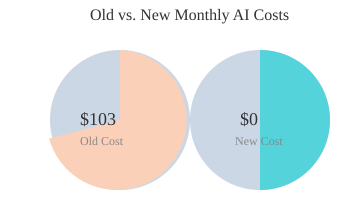
| Total | $103 | $0 | $103 |
Relay.app and Claude Skills: No-Code, Nearly Free AI Automations
With tools like Relay.app, you can build no-code automated AI agent workflows—often without ever leaving the free plan. Relay’s AI assistant lets you describe your workflow and builds it for you, making automation accessible even if you’re not technical. For more advanced needs, N8N’s self-hosted version is completely free, and Claude skills let you create custom automations inside your AI note-taking tool, all without extra costs or code.
Repurposing on Autopilot: Relay.app + Claude for Multi-Platform Posts
Repurposing content used to mean paying $35/month for Descript or Repurpose.io. Now, you can ask Claude to build a skill that transforms your blog post or video transcript into LinkedIn, Instagram, Facebook, and Twitter posts—all in one go. Relay.app can automate the entire process: grab your latest YouTube transcript, send it to Claude, get your approval via Slack, and post it to social channels. All this, for free.
Chart: Total Monthly AI Costs Slashed
Wild Card: What If Automation Tools Were Pay-What-You-Want?
Imagine a world where your favorite automation tools let you pay what you want. Would you still upgrade? With today’s free and low-cost AI note-taking tool options, you might find that you don’t need to spend at all—unless you want to support the creators or unlock premium features.
Navigating the Trinkets and Tiers: NotebookLM Free vs. Plus vs. Enterprise
When it comes to NotebookLM pricing, Google offers three main tiers: Free, Plus, and Enterprise. Each plan is designed to fit different types of users, from solo creators to large organizations. Here’s how they stack up—and how to know when it’s time to upgrade.
Quick Overview: What You Actually Get
| Plan | Notebooks/User | Sources/Notebook | Daily Queries | Audio Overviews/Day | Price |
|---|---|---|---|---|---|
| Free | 100 | 50 | 50 | 3 | $0 |
| Plus | 500 | 300 | 500 | 20 | $20/mo (Google One AI Premium) |
| Enterprise | 5x higher limits* | 5x higher limits* | 5x higher limits* | 5x higher limits* | $9/user/mo (annual) |
*Compared to Free tier; exact numbers may vary based on organization needs.
Who Should Consider Upgrading?
- Free Plan: Ideal for light users, students, or anyone just starting out. You get 100 notebooks, 50 sources per notebook, and 50 queries per day—enough for basic research and note-taking.
- NotebookLM Plus: Perfect for power users, researchers, or small teams who need more capacity. As one user put it,
“NotebookLM Plus provides 5-10x more capacity than the free tier.”
With 500 notebooks, 300 sources per notebook, and 500 queries daily, you can handle larger projects and more complex workflows. - Enterprise: Tailored for organizations needing enterprise-level security (VPC-SC, IAM), advanced admin controls, and higher usage limits. At $9/user/month (annual), it’s a cost-effective upgrade for businesses managing sensitive data or large teams.
Real-World Use Cases
- Solo Creators & Students: The Free plan is great for class notes, personal research, or side projects. If you’re a U.S. student 18+, you can unlock the Plus tier for just $9.99/month for 12 months—making advanced features accessible on a budget.
- Growing Teams: Agencies and startups often hit the Free plan’s limits quickly. When I maxed out the free plan—running into the 50-queries-per-day cap during a client research sprint—I knew it was time to switch to Plus. The jump in capacity was a game-changer for productivity.
- Enterprises: Large companies and educational institutions benefit from bulk licensing, custom security, and integration with Google Workspace or Cloud. Education access and discounts are available for qualifying organizations.
Limits, Perks, and Collaboration
Each tier unlocks more than just higher limits. Plus and Enterprise plans offer enhanced sharing and collaboration, more audio overviews, and priority support. You can create, share, and manage more data without worrying about hitting daily caps. Integration with Google One AI Premium also brings Gemini Advanced and 2TB storage to Plus users.
Privacy and Security: From Basic to Enterprise-Grade
Security scales with your plan. The Free and Plus tiers offer standard Google privacy protections, while Enterprise adds advanced controls like VPC-SC and IAM. This is crucial for organizations handling confidential information or requiring strict compliance.
A Little Context, Please: NotebookLM’s Unique Features and Some Personal Surprises
If you’ve ever been frustrated by AI tools that “forget” your context or hallucinate details, you’ll appreciate how NotebookLM changes the game as an AI research assistant. Unlike most chatbots that pull from your entire chat history (and sometimes get confused), NotebookLM is designed to only see the content inside your current notebook. This context-restricted approach means your AI assistant is laser-focused on the specific project or research you’re working on—no more accidental cross-talk from unrelated chats or documents.
Why Context Matters: Precision Over Guesswork
NotebookLM’s unique approach to context isn’t just a technical detail—it’s a practical advantage. Because the AI only references your current notebook, you get lower hallucination rates and much more reliable research verification. In day-to-day use, this means fewer errors, less miscommunication, and more confidence that the information you’re getting is actually grounded in your uploaded sources. For anyone who’s ever had an AI tool invent a “fact” or misattribute a quote, this is a huge relief.
Customization Options: Tailor Your Outputs
One of the standout features is the ability to customize tone, response length, and even output format. Whether you want a concise summary, a detailed report, or a quirky, conversational reply, you can set your preferences right in the prompt. I’ve stumbled on some surprisingly fun use cases—like generating podcast-style audio summaries of meeting notes, or having NotebookLM create a timeline of project milestones in seconds. The Notebook sharing features also make it easy to collaborate, letting you invite team members or clients to view or edit your AI-powered research and outputs.
Integration: Seamless with Google Workspace and Beyond
NotebookLM doesn’t just live in a silo. It integrates smoothly with Google Workspace, Slack, GitHub, Jira, and more. This means you can pull in documents, spreadsheets, code snippets, and meeting notes from your favorite business tools, then have NotebookLM analyze, summarize, or transform them as needed. You can even export results directly to Google Slides, Docs, or other formats, making it easy to plug AI-generated content into your existing workflows.
More Than Just Note-Taking: Audio, FAQs, Timelines, and More
Don’t let the “notebook” name fool you—NotebookLM is a full-featured AI research assistant that can automate a wide range of tasks. Some of the most impressive features include:
- Generating podcast-style audio overviews of your notes
- Creating FAQ sections from dense research documents
- Building timelines or mind maps from meeting transcripts
- Summarizing YouTube videos, PDFs, and even audio files
These features go far beyond simple note-taking, letting you repurpose and share information in whatever format your business needs.
Personal Surprise: The Three-Minute Task Tracker
Here’s a personal anecdote: I once asked NotebookLM to create a custom task tracker based on a messy Google Doc of project notes. In under three minutes, it generated a fully structured tracker—complete with deadlines, owners, and status columns—that was more accurate than anything I’d built manually. This level of automation and accuracy was genuinely surprising, and it’s a testament to how powerful context-aware AI can be when it’s focused on your specific needs.
In short, NotebookLM’s context-restricted AI, deep customization options, and robust notebook sharing features make it a standout choice for anyone looking to streamline research, automate workflows, and avoid the pitfalls of generic, error-prone AI tools.
FAQ: Getting the Most from NotebookLM and Smarter AI Stacks
How do I know which plan is right for me?
Choosing the right plan for NotebookLM and other AI productivity tools starts with a clear audit of your actual usage. Most business owners and teams will find that the free or Plus plans cover their core needs, especially if you’re primarily using NotebookLM for note consolidation, research, and content generation. The free tier is generous for individual users or small teams, while the Plus or Enterprise plans are best for larger organizations needing advanced security, higher usage limits, or priority support. Regularly reviewing your usage and comparing it with your workflow requirements is the best way to avoid overpaying and to maximize your savings.
Does NotebookLM really replace Perplexity, Otter, Jasper, and others?
Yes, for most business use cases, NotebookLM can effectively replace several standalone tools like Perplexity Pro, Otter.ai, Jasper, and even more specialized productivity tools. NotebookLM pricing is especially attractive because it bundles deep research, note-taking, content creation, and data synthesis in one platform—often for free. By leveraging its integrations and AI-powered features, you can streamline workflows that previously required multiple subscriptions. However, if your business relies on highly specialized features unique to a particular tool, you may want to test NotebookLM alongside your current stack before fully switching.
How do I migrate my data and adjust my workflow?
Migrating to NotebookLM and smarter AI stacks is usually straightforward. Most AI tools, including Otter and Fireflies, allow you to export transcripts or notes as text, PDF, or DOCX files. Simply import these files into NotebookLM to consolidate your data. For content creation, copy your templates or ongoing projects into Claude or Gemini. Retraining your team is often a matter of sharing new workflow guides and holding a short onboarding session. The transition is smoothest when you map your old processes to the new platform’s features, ensuring no critical step is missed.
What happens if I exceed free plan limits?
If you hit the limits of NotebookLM’s free plan—such as the number of notebooks, file uploads, or monthly queries—you’ll receive a prompt to upgrade. For most small businesses, these limits are generous, but if you find yourself consistently needing more, the Plus or Enterprise tiers offer expanded capacity at a fraction of what you’d pay for multiple standalone AI tools. Always monitor your usage, and only upgrade when your workflow truly demands it. This approach ensures you’re paying for real value, not just peace of mind.
Are there privacy or security concerns with cloud-based AI note-taking?
Security and privacy are top priorities for cloud-based AI tools like NotebookLM. All plans offer configurable privacy settings, and the Enterprise tier provides enhanced security features such as advanced encryption, audit logs, and compliance options. For most business use cases, the default settings are sufficient, but if you handle sensitive or regulated data, consider upgrading to Enterprise and reviewing your organization’s privacy policies. Always check the provider’s documentation for the latest security updates and best practices.
Tips for maximizing savings and new capabilities—quick checklist
To get the most from NotebookLM and your AI stack, regularly audit your subscriptions, consolidate overlapping tools, and choose plans based on actual usage. Take advantage of free trials and community resources to stay updated on new features. Train your team to use integrated workflows, and periodically review your processes for further optimization. By focusing on smarter, fewer tools, you’ll not only cut costs but also unlock new efficiencies and capabilities for your business.
In conclusion, the real cost of AI isn’t just about monthly fees—it’s about how wisely you choose, use, and combine your productivity tools. With NotebookLM and a smarter AI stack, you can streamline your workflows, boost profitability, and reclaim both time and budget. If you’re ready to take the next step, start with a usage audit and explore how these solutions can transform your business today.
TL;DR: You don’t need a cluttered stack of AI tools to run a modern business. By maximizing NotebookLM and a handful of versatile apps, you can boost productivity, cut monthly expenses by $200 or more, and streamline everything from note-taking to automation.
Post a Comment