

The other day at work, someone marched in asking for a ‘ploud’—something I’d frankly never heard of. A few minutes of Googling later and I’d stumbled into the AI voice recorder arms race, where gadgets boast ChatGPT-powered brains and promise to turn your ramblings or meeting banter into polished documents. But do you really need a $270 gizmo (plus subscription) that your phone could arguably replace? Or is AI voice tech actually pushing us somewhere new—and possibly a little strange? Grab a cuppa; let’s unravel this together, warts and wonders included.
From Dictaphones to Digital: When Did We All Start Talking to Our Gadgets?
Have you ever been caught off guard by a tech request at work? Recently, someone came in asking for a “ploud” device. At first, I had no idea what they meant. After a quick search, I realized they were talking about the PLAUD Note—a ChatGPT-powered AI voice recorder. It was one of those moments where you think, “Of course that’s a thing now. Why wouldn’t it be?” This experience got me thinking about how far we’ve come from the days of clunky tape dictaphones to today’s sleek, AI-powered digital voice recorders.
A Quick Rewind: From Dictaphones to Digital Voice Recorders
Let’s take a step back. The original dictaphones were bulky, analog machines using magnetic tape. If you’re old enough, you might remember microcassette recorders—those pocket-sized gadgets that journalists, doctors, and your tech-curious uncle swore by. They were simple: press record, talk, rewind, and play back. Over time, these evolved into digital voice recorders, which swapped tapes for memory chips and USB ports, making audio capture easier and more reliable.
The Rise of AI: What Makes an AI Voice Recorder Different?
So, what sets an AI voice recorder apart from your trusty smartphone or classic digital recorder? The answer is in the software. AI voice recorders like PLAUD Note and Botslab’s AI Note Taker use advanced AI transcription technology—often powered by platforms like ChatGPT—to transcribe, summarize, and even label speakers in real time. These devices aren’t just capturing sound; they’re turning conversations into organized, searchable text as you speak.
- Real-time transcription with high accuracy, even in noisy environments.
- Speaker identification and labeling for multi-person meetings.
- Automatic summarization of long recordings.
- Integration with cloud platforms for easy sharing and collaboration.
Compared to smartphones, AI voice recorders typically outperform in noise management and transcription accuracy. While iPhones and Android devices offer built-in voice memo and transcription apps, they often lack the advanced features and reliability of dedicated AI-powered devices.
Nostalgia Break: Remember Your First Voice Note?
There’s a certain nostalgia in remembering the first time you—or maybe your uncle—used a microcassette recorder to capture a quick thought. Fast forward to today, and you’re talking to a device that not only records but understands and organizes your words. As one IT professional put it:
"From years of being IT at hospitals, doctors would use dictation software anyway with like microphones. And like that was very common."
Why Pay Hundreds for a Separate AI Voice Recorder?
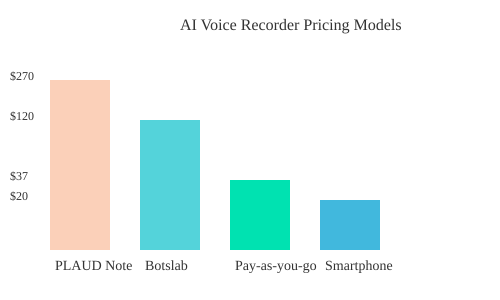
It’s a fair question. With smartphones in every pocket, why are people willing to pay $270 for a PLAUD Note (plus a required subscription), or consider Botslab’s AI Note Taker, which offers a year of free transcription and then 600 minutes monthly at no extra cost? The answer lies in specialized AI voice recorder features—like dual-mode precision, speaker labels, and automatic summarization—that go beyond what most phones can do. For professionals who rely on accurate, organized transcripts, these tools are more than just gadgets; they’re productivity boosters.
Key Brands and the ChatGPT Factor
Today’s market is led by brands like PLAUD, Botslab, and OBSBOT, all racing to integrate the latest AI models like ChatGPT into their devices. These companies are pushing the boundaries of what a digital voice recorder can do, transforming how we interact with our gadgets—and how our gadgets interact with us.
($200+)
Recorders
($100-200)
Recorders
($80-150)
Memos & Apps
PLAUD, Botslab,
OBSBOT
($200-300+)
Bluetooth, Buzzwords, and Bottom Lines: Breaking Down the Real Features (and Costs) of AI Voice Recorders
When you look at the latest AI voice recorders, it’s easy to get lost in the marketing lingo—MagSafe attachments, “ChatGPT-powered” transcription, and promises of seamless productivity. But what do these devices really offer, and are they worth the price compared to your smartphone’s built-in voice memo or voice to notes apps? Let’s break down the real features, costs, and hidden extras of today’s digital voice recorder market.
Comparison Table: Cost, Subscription Models, and Standout Features
| Brand/Device | Upfront Cost | Subscription/Fees | Key Features |
|---|---|---|---|
| PLAUD Note | $270 | Subscription required | ChatGPT transcription, MagSafe, dual-mode recording, app integration |
| Botslab | $0 (device cost varies) | 600 free min/month, no sub fees | Noise cancellation, multilingual, workflow integration |
| Pay-as-you-go Services | $0 | ~$0.37/hour | Flexible, no device needed, cloud-based |
| Smartphone Apps | Included with phone | Usually free or low-cost | Basic transcription, voice memos, limited accuracy |
Who Needs What? Are the Perks Actually Game Changers?
Some features, like MagSafe attachment or dual-mode precision microphones, sound impressive. If you’re a project manager recording meetings all day or a journalist needing reliable, high-quality audio, these perks might matter. But for most users, the real value comes from AI tools for productivity—like automatic transcription, summarized meeting notes, and integration with apps like Zoom or Slack.
Subscription Drama: The Creeping Cost of AI Voice Recorder Subscriptions
Here’s where things get tricky. Many AI voice recorders, like the PLAUD Note, require a pricey subscription on top of a high upfront cost. Others, like Botslab, offer generous free minutes each month or even a year of free transcription. Pay-as-you-go models (about $0.37/hour) are emerging, letting you pay only for what you use. But beware: subscription fees can add up fast, sometimes costing more than the device itself over time.
Hidden Extras: Workflow Integration and Smart Features
- Integration with productivity apps (Zoom, Slack, Notion)
- Automatic to-do lists and summarized notes
- Noise cancellation and multilingual support
- MagSafe or magnetic attachments for convenience
These extras can be powerful for professionals, but may be overkill for casual users.
Smartphone Showdown: Are Built-in Apps Good Enough?
Many users wonder: “To buy another device instead of just using your phone seems a bit excessive.” Most smartphones offer built-in voice memo apps and third-party voice to notes apps for iPhone or Android. While these are convenient and often free, their transcription accuracy can lag behind dedicated AI devices—especially in noisy environments or with multiple speakers. However, for basic needs, your phone may be all you need.
Personal Take: Would You Shell Out for a Dedicated Device?
Ask yourself: Do you need advanced AI tools for productivity, or is your phone’s digital voice recorder enough? If you’re constantly in meetings or interviews and need top-notch accuracy and workflow integration, a dedicated AI voice recorder might be worth the investment. Otherwise, your smartphone and a good app could do the job—without the subscription drama.
The Productivity Pitch: When AI Voice Recorders Genuinely Shine (And When They Don’t)
AI voice recorders are everywhere—from offices and building sites to classrooms and clinics. But do these AI tools for productivity actually deliver on their promise, or are they just adding more digital noise? Let’s break down where AI voice recorder technology truly shines, where it stumbles, and what you should consider before making it part of your workflow.
Where AI Voice Recorders Boost Productivity
In environments where documentation is king, AI transcription technology is a game-changer. Take project managers in construction or tech: meetings, site walkthroughs, and client calls all generate valuable information. With an AI voice recorder, you can capture every detail and get real-time transcription—no more scrambling for notes or missing key points. In fact, top tools like the Botslab AI Note Taker now claim up to 98% accuracy in real-world settings, even across 120 languages. That’s a huge leap for anyone who’s ever lost track during a fast-paced meeting.
Healthcare is another area where AI tools for productivity are making a real impact. Doctors now routinely use AI-powered transcription in clinics, often with patient consent. As one IT professional put it:
"I think that makes sense and that's like a sort of the stuff that AI should probably be used for—to like productivity needs, right?"
Here, AI voice recorders help doctors focus on patients instead of paperwork, while creating accurate, searchable records for follow-up care.
Integration Wins: Seamless Workflows
The real magic happens when AI transcription technology is integrated into your existing tools. Platforms like Zoom and Slack now offer auto-transcription and meeting summarization, making it easy to revisit discussions or share highlights with your team. Many AI voice recorders also feature dual-mode settings (like “meeting” vs. “interview”) for better context recognition and improved AI transcription accuracy.
| AI Recorder Feature | Benefit |
|---|---|
| Botslab AI Note Taker | Transcribes up to 120 languages with 98% accuracy |
| Dual-Mode Recording | Adapts transcription for meetings or interviews |
| Integration with Zoom/Slack | Auto-transcription and summarization in real time |
Potential Downsides: Where AI Still Falls Short
Despite impressive advances, AI voice recorders aren’t perfect. Transcription errors can creep in, especially with strong accents (Aussie English, anyone?), background noise, or multiple speakers. Even with high AI transcription accuracy, you might spend extra time fixing mistakes—time that could eat into the productivity you hoped to gain.
There’s also the legal side. Recording meetings or calls without consent can land you in hot water, especially in client-facing roles. Always check your local laws and get permission before hitting record.
When Human Touch Still Matters
For detailed work—think legal, medical, or research notes—the hidden cost of fixing bad auto-transcriptions can be significant. While AI tools for productivity are great for capturing the gist, you may still need a human review for accuracy and context. That’s especially true when nuance or specialized terminology is involved.
Personal Wish-List: Making AI Voice Recorders Indispensable
- Better accent recognition and speaker identification
- Smarter context awareness for different meeting types
- Seamless integration with more productivity platforms
- Transparent privacy controls and consent prompts
Ultimately, AI voice recorders have the potential to transform how you work—if you choose the right tool and use it wisely.
Push the Button and Hope: The Legal and Ethical Minefield of Constant AI Recording
With AI voice recorders and AI transcription technology becoming more powerful and accessible, it’s easier than ever to record meetings, calls, or even entire days of conversation. But just because you can record everything, does that mean you should? The legal implications of recording are more complicated than ever, especially as these devices move from controlled office settings into everyday life.
Legal Implications Recording: When Is It OK to Record?
The rules around recording conversations vary widely. In some countries and states, you only need one person’s consent (often yourself) to record a call or meeting. In others, everyone involved must agree. This patchwork of consent laws means that what’s legal in one place could get you into serious trouble somewhere else.
For example, if you’re recording every single voice call you have with a potential client without letting them know, you could be breaking the law. As one concerned user put it:
"...if you're recording every single voice call you have with a potential client without letting them know...there has to be some legal ramifications somewhere."
In professional environments, the legal requirement for consent is often mandatory. Failing to follow these rules can lead to lawsuits, fines, or loss of trust.
The ‘Training Purposes’ Excuse: Does It Really Provide Legal Cover?
You’ve probably heard the phrase, “This call is being recorded for training purposes.” Businesses use this announcement to cover themselves legally, but it’s not just a formality. It’s a requirement in many places to notify all parties that a recording is happening. However, just saying it isn’t always enough—there must be clear consent, and the rules can change depending on whether the call is personal or business-related.
AI Privacy and Compliance: What Are You Really Agreeing To?
AI transcription technology brings new challenges for privacy and compliance. When you use an AI voice recorder, what happens to your data? Are you signing away more than you realize in the fine print? Many AI-powered gadgets upload audio to the cloud for processing, raising questions about who can access your conversations and how securely they’re stored. The risk of data breaches or misuse is real, and regulations are struggling to keep up.
Accidental Eavesdropping: More Than Just the Meeting
One major AI transcription challenge is accidental recording. If you’re walking around with a device that’s always on, it might pick up private conversations, sensitive information, or even background noise that wasn’t meant to be recorded. This can create privacy headaches for everyone involved, especially if the recordings are stored or shared without proper safeguards.
Case Study: AI-Generated Medical Notes and Consent Forms
Healthcare is one area where AI transcription technology is quickly becoming mainstream. Doctors now routinely use AI to generate medical notes, but this comes with new compliance requirements. Patients are increasingly asked to sign consent forms allowing their data to be processed by AI. As one patient noted, “One of the forms I needed to fill out was consent for the doctor to use transcription AI to keep notes of the session.”
This shift shows how legal paperwork is growing in workplaces, and how consent is now a routine part of using AI in sensitive environments.
| Context | Legal Requirement |
|---|---|
| Recording calls/meetings (professional) | Consent often mandatory |
| Healthcare (AI medical note-taking) | Consent forms becoming standard |
Can AI Voice Recorders Guarantee Data Security?
As AI voice recorders become more common, the question of AI transcription security is front and center. Can these devices really guarantee your data is safe? With so much sensitive information being recorded and transcribed, even a small security flaw could have big consequences. For now, the best you can do is understand the risks, follow the law, and always get clear consent before you hit record.
Lost in Transcription: Why AI Still Stumbles (and Sometimes That's a Good Thing)
Real-World Pain: Voice Recognition Challenges in the Wild
If you’ve ever tried using an AI voice recorder in a busy office or a noisy café, you know the struggle. Even with the latest AI transcription technology, real-world environments throw curveballs: background chatter, clattering keyboards, and the unpredictable rhythm of human conversation. Add in heavy accents or regional slang, and you’ll quickly see why AI transcription accuracy isn’t always what the marketing promises. As one user put it,
"The sooner they can figure out the Australian accent the better."It’s not just a punchline—accents and ambient noise remain two of the toughest voice recognition challenges for AI, even as error rates drop year after year.
The Charm of Imperfection: Amusing and Oddball AI Transcription Fails
Despite all the advances, AI transcription challenges still lead to some hilarious results. If you’ve ever left auto-generated captions on a video, you’ve probably spotted a few gems—like “shit out from Riverside” instead of a more professional phrase. Sometimes, these mistakes are so odd or funny that you almost don’t want to fix them. There’s a certain charm in the way AI interprets our words, especially when it’s just a little out of sync with reality. These bloopers can even add personality to your content, making it more memorable for viewers.
Accent Mess-Ups and Out-of-Context Summaries: Is AI Catching Up?
It’s true that AI transcription technology has come a long way. Brands like Botslab now advertise up to 98% accuracy across 120+ languages. But here’s the catch: those numbers drop fast when you throw in strong accents or lots of background noise. For many users, especially those with Australian, Scottish, or regional American accents, the AI still stumbles. You might find yourself reading a transcript and wondering, “Did I really say that?” Out-of-context summaries and strange word choices are still common, showing that the tech is impressive—but not infallible.
DIY Fixes: The Satisfying (and Tedious) Art of Editing Transcripts
No matter how advanced your AI voice recorder is, manual correction is still part of the workflow. Creative professionals, journalists, and podcasters often go back to “fix up shit or whatever,” as one user described it. While editing can be tedious, there’s something oddly satisfying about cleaning up a messy transcript and turning it into a polished piece of content. It’s a reminder that, for now, human oversight is still essential—especially for creative projects or niche industries where accuracy matters.
The Future of AI Transcription Accuracy: Is 100% Even Possible?
With each year, AI transcription accuracy improves. Five years ago, you’d be lucky to get a transcript that made sense at all. Today, most errors are minor, but perfection still feels out of reach. Accents, slang, and unexpected pauses continue to trip up even the best AI. Will we ever see a day when you can trust a transcript without a single edit? Maybe—but for now, a little imperfection is part of the process.
Creative Tangent: What If Deliberate Errors Became a Digital Watermark?
Here’s a thought: what if those quirky transcription errors became a kind of digital signature? Imagine AI-generated transcripts with intentional, unique mistakes—like a watermark—so you could always tell the difference between human and machine. In a world obsessed with authenticity, maybe a little imperfection is exactly what we need.
When the Robots Do Our Homework: The Academic and Ethical Big Picture
ChatGPT and the Great High School Essay Dodge
Imagine this: You’re chatting with a group of high schoolers at work, and the topic of homework comes up. One mentions an essay due that night, and before you know it, two others chime in, “Just use ChatGPT.” For many students, AI transcription technology and content generators have become the go-to shortcut for assignments. When asked if they’ve actually written any of their essays themselves, the answer is often a casual “No, just ChatGPT.” The process doesn’t end there—they’ll run the AI-generated text through a ‘humanizer’ app to make it sound less robotic and avoid detection by teachers.
This isn’t just a one-off story. Surveys and web traffic data show a clear uptick in students using AI tools to draft schoolwork, then passing it through AI ‘humanizer’ tools to bypass plagiarism detectors. For educators, keeping up with these tactics is a constant challenge. The question is, are kids really learning, or just outsmarting the system?
AI-Generated Content Ethics: Where’s the Line?
With the rise of ChatGPT academic use, the line between authentic work and AI ‘help’ is getting blurry. Is it ethical to use AI to generate your homework, then tweak it just enough to call it your own? This is the heart of the AI-generated content ethics debate. Some argue that using AI as a tool is no different from using a calculator or spellchecker. Others see it as a shortcut that undermines the purpose of education—learning to think and express yourself.
Major academic integrity concerns are surfacing. Teachers and professors are struggling to monitor and safeguard against AI-generated academic submissions. The conversation is shifting from “Is this cheating?” to “What does authentic work even mean in an AI-driven world?”
Media Literacy Education: The Erosion of Critical Thinking
Experts warn that the widespread use of AI for opinions or analysis is eroding critical thinking skills. As one observer put it,
“It is, that is the death of media literacy.”If students rely on AI to tell them what to think about a book, film, or piece of art, they miss the chance to form and express their own ideas. Media literacy education, which once focused on understanding and critiquing information, now faces a new challenge: teaching students to value their own reflections over AI-generated ones.
The Temptation: Shortcuts and What We Lose
AI tools are tempting—they save time and effort. But what are we losing if we never pause to reflect for ourselves? If you watch a movie and immediately ask a robot to explain what you should feel or think, you’re outsourcing your own subjectivity. Even if your interpretation is “wrong” or incomplete, it’s still yours. The danger is not just in using AI to do the work, but in letting it do the thinking.
Wild-Card Tangent: Robots as Critics—Is Subjectivity at Risk?
What happens if robots start critiquing art and movies for us? If AI can generate reviews and opinions, is our personal response still valuable? There’s something unsettling about looking at a painting or listening to music, then turning to AI to tell you how to feel. Are we at risk of losing the messy, personal side of interpretation that makes art and media meaningful?
Are Teachers Catching Up—or Fighting a Losing Battle?
Educators are racing to keep up with the rapid adoption of AI tools. Some are updating assignments to require more personal reflection or in-class discussion. Others are using advanced AI detectors, but students are quick to adapt, using ‘humanizer’ apps to mask AI origins. The academic landscape is shifting, and the definition of ‘your own work’ is more contested than ever.
Survival Guide: How to Choose (or Skip) an AI Voice Recorder in 2024
Checklist: Do You Really Need a Dedicated AI Voice Recorder?
Before you dive into the world of AI voice recorder comparison, ask yourself a simple question: "Would you shell out for a dedicated device, or is your phone good enough?" In 2024, most smartphones come packed with robust voice to notes apps and built-in AI transcription technology. For many, this is more than enough. If you’re only recording the occasional lecture, meeting, or personal note, your phone’s native app likely covers your needs.
- Are you recording daily, or just once in a while?
- Do you need advanced features, or just basic voice capture?
- Will you use transcriptions for work, legal, or compliance reasons?
- Is hands-free operation or multi-device sync essential?
According to recent surveys, up to 70% of users who purchased AI voice recorders cite meeting efficiency as their main driver. But for casual users, overbuying is common—your smartphone may already be the best digital voice recorder you own.
Must-Have AI Voice Recorder Features
If you decide a dedicated device is right for you, focus on features that truly matter. Here’s what to look for in any AI voice recorder comparison:
- Accuracy: How well does it capture and transcribe speech, even with accents or fast talkers?
- Noise Cancellation: Can it filter out background chatter or hums?
- Real-Time Transcription: Does it turn voice into text instantly, or do you have to wait?
- Security: Are your recordings encrypted? Who can access your data?
- App Integration: Does it sync with your favorite note-taking or productivity apps?
Don’t forget to check for battery life, storage, and whether the device supports cloud uploads or offline use.
Practical Questions Before You Buy
- What will you record? Is it interviews, lectures, meetings, or personal memos?
- How will you use transcriptions? For sharing, archiving, or compliance?
- Can you justify the cost? Is the investment worth it for your workflow?
- What about privacy? Does the device comply with local laws and consent requirements?
Always check privacy policies and ask about legal consent—especially if you’re recording others.
Who Should Try a Dedicated AI Voice Recorder?
- Professionals: If you’re in meetings all day, or work in regulated fields (like law or healthcare), advanced AI transcription technology and compliance features are a must.
- Journalists & Podcasters: High-quality audio and accurate transcription can save hours of editing.
- Students & Everyday Users: Most will find voice to notes apps on their phones sufficient.
Quirky Advice: Don’t Let FOMO Drive Your Decision
It’s easy to get caught up in the hype. Just because a device magnetically snaps to your phone or boasts “AI-powered everything” doesn’t mean you need it. Sometimes, less tech is more. If your current setup works, don’t let FOMO (fear of missing out) push you into unnecessary purchases.
Recap: What Actually Matters?
- Efficiency: Does it make your life easier?
- Compliance: Does it meet your legal and privacy needs?
- Novelty: Are you buying it just because it’s new?
In the end, the best digital voice recorder is the one that fits your real needs—not just the latest gadget on the shelf.
FAQ: Your Oddest, Most Pressing, or Possibly Paranoid Questions About AI Voice Recorders, Answered
When you first hear about a $270 “ploud AI note chat GBT powered AI voice recorder” (plus a subscription fee), you might wonder: is this a revolution in productivity, or just another expensive gadget? As AI transcription technology becomes more common, it’s normal to have a lot of questions—some practical, some legal, and some that might sound a bit paranoid. Here’s what you need to know, based on real workplace scenarios and the latest AI voice recorder comparison insights.
Is it legal to record conversations at work in my country?
This is one of the most important questions. Laws vary widely: in some places, you need everyone’s consent to record; in others, only one party (possibly you) needs to know. Even if your country allows it, your company or client may have stricter rules. Always check local laws and your workplace policy before hitting “record”—especially if you’re using an AI voice recorder for meetings or client calls.
What’s the best AI voice recorder for meetings in noisy environments?
AI voice recorder comparison reviews suggest that while specialized devices like the ploud AI note chat GBT powered AI voice recorder promise advanced noise cancellation, many modern smartphones (with the right app) perform nearly as well. If you’re often in loud settings, look for devices or apps that specifically advertise noise reduction and test them in your real environment before committing.
Are AI voice recorders better than smartphones?
For most people, your smartphone’s built-in recorder—especially on newer models—offers solid performance. Dedicated AI voice recorders may be worthwhile if you need to multitask on your phone or require higher accuracy, but for many, the difference is marginal. Consider your actual needs before investing in a specialized device.
How accurate is real-time transcription with today’s best devices?
AI transcription technology has improved dramatically, but it’s not perfect. Most devices and apps get close to 90-95% accuracy in ideal conditions. Accents, background noise, and technical jargon can still trip up even the best AI voice recorders. Expect the occasional amusing error—think “funny little mistakes” in your transcripts.
Can I use AI voice recorders for interviews or lectures?
Absolutely. These tools are designed for exactly that—turning spoken words into searchable, editable text. Just remember: you may need to inform everyone present that you’re recording, depending on the setting and local laws.
Do I need to tell people I’m recording them?
Yes, in most cases. Whether it’s a business meeting or a phone call, transparency is key. Not only is this often a legal requirement, but it also builds trust with colleagues and clients.
Are AI-generated transcripts safe and private?
Privacy depends on the service. Some AI voice recorders store data locally; others upload it to the cloud. Always read the privacy policy, especially if you’re handling sensitive information—like in healthcare or legal settings.
What if my accent confuses the recorder?
AI transcription technology is getting better with accents, but it’s not flawless. You may need to correct occasional errors. Some platforms let you “train” the AI to your voice over time for improved accuracy.
How much do AI voice recorders really cost, all-in?
Expect to pay $100–$300 for a dedicated device, plus a subscription fee (monthly or yearly) for advanced features. Many apps offer free trials, so you can test before you buy.
Can I use these tools offline?
Some AI voice recorders and apps work offline, but many require an internet connection for real-time transcription. Check before you buy if offline use is important to you.
Do students use AI voice recorders (and does it count as cheating)?
Yes, students use these tools for lectures—and sometimes for less ethical purposes, like using ChatGPT to write essays. While recording lectures is usually fine, submitting AI-generated work as your own is a gray area and can undermine your learning.
What about privacy in healthcare settings?
AI transcription is increasingly common in healthcare, but strict privacy laws apply. Always ask how your data is stored and who can access it.
What’s the typical subscription model—monthly, yearly, or pay-as-you-go?
Most AI voice recorders offer monthly or yearly subscriptions, with discounts for annual plans. Some have pay-as-you-go options for occasional users.
Do voice to notes apps work as well as dedicated recorders?
For many, yes. The gap is narrowing as smartphone apps improve. Unless you need advanced features or hands-free operation, an app may be all you need.
Are there free trial options or ways to test before I buy?
Most reputable AI voice recorder apps and devices offer free trials or demo versions. Always try before you buy to ensure the tool fits your workflow and environment.
In conclusion, AI voice recorders can boost productivity and streamline note-taking, but they’re not magic. Weigh the real benefits against the cost, privacy implications, and your own needs. Whether you’re a project manager, student, or healthcare professional, understanding these tools—and their limitations—will help you decide if they’re a revolution or just more noise.
TL;DR: AI voice recorders are full of promise, but not without their quirks, costs, and controversy. From legal headaches to productivity hacks, it’s a fascinating field—just don’t forget your phone already does most of it.
Post a Comment