

Picture this: it’s 2 a.m., you’re surrounded by empty coffee cups, and your brain refuses to type a single sentence more. Desperate, you mutter a half-coherent email into your mic and—bam!—it cleans up your rambling and spits out a perfect draft. Welcome to the world of modern, wildly generous free AI tools. After a year of tinkering, failing, and having improbable successes with nearly a dozen of them, I’m convinced the line between ‘work’ and ‘magic’ is getting thin. (Seriously, have you ever watched a robot write a pop-punk anthem for your newsletter?) Today, let’s skip the obvious AI stars and dive into the lesser-known heroes that make my work and play shockingly easy.
1. The World According to Free AI: How Generous Are The Free Tiers, Really?
Welcome to the golden age of Free AI Tools. If you’ve ever wondered just how much you can do with zero dollars, you’re in for a treat. In 2024, the best AI tools are not only smarter—they’re shockingly generous with their free plans. Forget the old days of “free trial” meaning “one click, then paywall.” Today, you can chat, create, design, dictate, and even make music or 3D worlds—without ever reaching for your wallet.
How Much Can You Really Do for Free?
Let’s get real: these aren’t just marketing claims. I’ve spent countless late nights (including one infamous midnight design panic) relying on free versions to solve real problems. Need to whip up a presentation, generate images for a blog, or even turn your camera manual into a podcast? The free plans have you covered.
- Gemini 3: Unlimited chat, advanced reasoning, research, and coding—free inside the Gemini app and Google’s AI Studio.
- Nano Banana Pro: The best free image creation and editing model, with a daily image generation quota.
- Suno: Compose up to 10 songs a day (50 credits) with their free plan—perfect for hobbyists and creators.
- Whisperflow: Dictate up to 2,000 words per week for free. As I’ve said:
'You can use [Whisperflow] for free for up to 2,000 words per week.'
- NotebookLM: Organize research with multiple notebooks and unlimited sources—no upgrade needed.
- Canva Magic Studio: Access text-to-design and a library of free templates. Pro unlocks more, but the basics are robust.
- 11 Labs: Generate 10,000 characters of AI voice per month, free—great for voiceovers or podcasting your camera manual.
- Comet Browser: Free on-page AI interaction, bringing smart suggestions as you browse.
- SAM 3: Try advanced segmentation in the full playground, free. Instagram integration is coming soon.
- Kling: Free credits for 5-second video clips—enough for quick experiments or social posts.
- Marble: Build 3D worlds in their free beta—no strings attached.
Industry Shift: Free AI Tools in 2025
Compared to the stingy “free” trials of the past, today’s AI Tools 2025 landscape is a revelation. You get thousands of words, dozens of images, or hours of creative output—sometimes every single day. Unexpected perks abound: turn dense documents into podcasts, generate music, or design social posts in seconds. The boundaries of “free” have never been wider.
Free Tier Feature Comparison
Here’s a quick look at what you can expect from the top free AI tools right now:
| Tool | Quota | Key Free Feature | Notable Limitations |
|---|---|---|---|
| Gemini 3 | Unlimited daily | Chat, coding, research | Some advanced features gated |
| Nano Banana Pro | Daily images (limit varies) | Image creation/editing | Quota resets daily |
| Suno | 50 credits/day (~10 songs) | Music generation | Song length limits |
| Whisperflow | 2,000 words/week | Speech-to-text dictation | Weekly reset |
| NotebookLM | Unlimited | Multiple notebooks/sources | Export options limited |
| Canva Magic Studio | Unlimited | Text-to-design, templates | Premium assets locked |
| 11 Labs | 10,000 chars/month | AI voice generation | Monthly reset |
| Comet Browser | Unlimited | On-page AI interaction | Browser-based only |
| SAM 3 | Unlimited | Segment Anything playground | Instagram integration pending |
| Kling | Credits for 5-sec videos | Short video generation | Clip length limited |
| Marble | Free beta | 3D world generation | Beta features only |
From dictation to design, music to 3D worlds, the best AI tools in 2024 are more accessible than ever. Dive in—you might be surprised how far “free” can take you.
2. Whisperflow and the End of Sloppy Transcription: Can a Robot Really Understand You Mumbling at 2 a.m.?
Let’s set the scene: It’s 2 a.m., you’re hunched over your laptop, and inspiration strikes. But your fingers? They’re tired. Your brain? Racing with technical jargon. You start mumbling an email draft—“Hey, need to update the engineering team on the Kubernetes migration, mention latency issues on the pods, and did we ever fix that CSS grid bug on mobile?”—and, shockingly, Whisperflow captures every word. No garbled mess. No missing punctuation. Just perfect, readable text. If you’ve ever tried to dictate a late-night brainwave only to see it mangled by a standard transcription app, you’ll relate to my (mildly embarrassing) revelation that Whisperflow gets me better than my old college roommate.
How Whisperflow Beats Standard Dictation Tools
Let’s be honest:
'Standard dictation isn't always the best and often skips formatting and doesn't fix your mistakes.'Most basic dictation tools struggle with anything beyond simple sentences. They miss technical terms, ignore punctuation, and leave you with a mess to clean up. Whisperflow is what AI Productivity Tools should be—an AI Writing Tool that actually listens, understands, and formats your thoughts, even when you’re half-asleep and mumbling tech speak.
- Precision: Whisperflow nails complex terms like “Kubernetes migration” and “CSS grid” without breaking a sweat.
- Formatting: It adds punctuation, line breaks, and even fixes your grammar on the fly.
- Speed: As I’ve discovered,
'It’s faster than I can type.'
Technical Test: Can It Handle Real-World Jargon?
I put Whisperflow to the test with a rambling, jargon-filled prompt:
Hey, I need to draft an email to the engineering team regarding the Kubernetes migration. Make sure to mention that the latency issues on the pods seem resolved. Also, did we ever fix that issue with the CSS grid not aligning on mobile devices?
The result? Perfect punctuation, flawless spelling, and every technical term transcribed correctly. No more stopping to fix “Kubernetties” or missing periods. Whisperflow’s advanced speech-to-text AI is built for real-world productivity.
How Far Can 2,000 Words Go?
Here’s the kicker: Whisperflow lets you use up to 2,000 words per week for free. That’s enough for:
- Dozens of student notes
- Multiple blog prompts
- Several detailed emails
- Brainstorming sessions and to-do lists
For most users, that’s more than enough to replace manual typing with accurate, AI-powered voice-to-text.
Secret Sauce: Mumbled Speech, Jargon, and Perfect Punctuation
What sets Whisperflow apart from other Free AI Tools? It doesn’t just transcribe—it understands. Whether you’re clear as day or mumbling through a fog of midnight ideas, it delivers clean, formatted text every time. That’s the magic of modern AI Writing Tools.
Chart: Weekly Word Usage for Dictation Tools
| Tool | Free Weekly Limit | Formatting Quality | Tech Jargon Accuracy |
|---|---|---|---|
| Whisperflow | 2,000 words | Excellent | Excellent |
| Standard Dictation | Varies | Poor | Low |
Wild Card: Dictation Duel—You vs. Superfast AI
Imagine a race: you typing furiously, AI listening calmly. Who wins? With Whisperflow, the answer is clear. Why type when you can just talk—and let AI do the rest?
3. Browsing Like a Research Wizard: Comet Browser’s On-Page Genius
If you’ve ever felt overwhelmed by a sea of open tabs, you’re not alone. The web is chaos, and most of us are guilty of tab-hoarding in the name of “research.” But what if you could turn that chaos into clarity—almost magically? Enter Comet Browser, a free AI research tool that’s quietly become my new default for reading, research, and even those lazy Wikipedia rabbit holes. Here’s why it’s the best AI tool for anyone who wants to browse smarter, not harder.
AI-Powered Browsing: From Tab Overload to Sanity
Let’s face it: switching between tabs and copy-pasting into ChatGPT is clunky. Comet Browser changes the game by baking AI directly into your browsing experience. Instead of toggling between apps, you get an on-page sidebar that lets you interact with the exact page you’re reading. No more blank chatbot windows—just ask about this article, this paragraph, or this concept, right where you are.
Instant Summaries and Bullet Points—Even for Quantum Mechanics
Imagine landing on a massive article about quantum mechanics (or any dense topic) and realizing you don’t have an hour to spare. With Comet’s sidebar, you can simply ask, “Explain this using bullet points and simple language.” In seconds, you get a clear, kid-friendly summary—no jargon, no fluff. As I watched Comet read and translate a complex article into easy bullet points, I thought, “This saves so much time when researching.”
Multi-Tab Research: Finding Overlapping Concepts
Here’s where Comet truly shines for students and researchers. Open three tabs—say, one on quantum mechanics, another on artificial intelligence, and a third on space exploration. Ask Comet to analyze all three and find the common threads. Instantly, it distills the overlapping ideas, helping you see the bigger picture without hours of manual note-taking. This is a game-changer for deep dives, essays, and interdisciplinary projects.
| Tab 1 | Tab 2 | Tab 3 | Overlapping Concepts |
|---|---|---|---|
| Quantum Mechanics | Artificial Intelligence | Space Exploration |
|
Sidebar Chat: Talk to the Page, Not Just a Bot
What sets Comet apart from Chrome plus ChatGPT? It’s the context. You’re not just chatting with an AI—you’re asking about the actual page you’re on. Whether it’s summarizing, explaining, or comparing, Comet’s sidebar is like having a research assistant who already knows what you’re reading.
Real-World Magic: Research, Study Hacks, and Curious Clicks
Whether you’re prepping for exams, writing a paper, or just following your curiosity, Comet’s free AI tools make research feel less like a chore and more like a superpower. The moment it picked out common threads between quantum mechanics, AI, and space exploration, I felt like I was running my own research lab—minus the stern librarian glare.
“This saves so much time when researching.”
With Comet Browser, the future of AI-powered browsing is here—and it’s free, fun, and surprisingly powerful for anyone who loves to learn.
4. NotebookLM & The Magic of Talking to Your Own Documents
Imagine this: you’re staring down a 557-page camera manual, survival instincts at an all-time low (let’s call it 1/10). You need to find out how to change the frame rate in manual video mode—fast. Enter NotebookLM, one of the best AI tools for students, researchers, and anyone who’s ever felt buried under a mountain of PDFs. This free AI tool doesn’t just read your documents—it becomes an expert on them, ready to answer your questions with laser precision.
"You upload documents and it becomes an expert on only those documents."
NotebookLM: Your Personal Document Whisperer
With NotebookLM, you simply upload your PDFs, manuals, or research papers. The magic? You can ask it anything about your documents, and it responds with clear, direct answers—complete with source citations. No more endless skimming or ctrl+F marathons. For example, after uploading that massive Sony camera manual, you can ask, “How do I change the frame rate in manual video mode?” NotebookLM will pull the exact step-by-step instructions and even tell you where to find them in the original document. It’s like having a superpowered research assistant, available 24/7.
Audio Overview: Turning Boring Docs into Engaging Podcasts
But here’s where NotebookLM really shines for AI students and lifelong learners: the Audio Overview feature. This tool takes your dense, technical documents and transforms them into a lively, two-host podcast. Instead of slogging through dry text, you get an engaging audio summary—perfect for those who learn better by listening. Imagine prepping for an exam or reviewing a contract while your “AI hosts” chat through the key points. It’s not just more fun; it might even help you remember more.
Surprising Uses: Beyond the Classroom
- Exam Prep: Summarize textbooks or lecture notes, then quiz yourself with targeted questions.
- Contract Review: Upload legal documents and ask for plain-English explanations or key clauses.
- Research Synthesis: Combine multiple papers into one notebook, then ask for trends, summaries, or direct comparisons.
- Technical Manuals: Find troubleshooting steps or settings without flipping through hundreds of pages.
Why NotebookLM Feels Like the Future
Somehow, a tool that digests a phonebook-sized manual and then chats you through it (or sings you a summary) feels like the future, especially for anyone facing a stack of readings a mile high. NotebookLM’s ability to synthesize long, multi-document content into bite-sized, accessible answers—with source references—makes it a must-have in the AI research tools toolkit.
| Feature | Details |
|---|---|
| Document Size | Handles documents up to 557 pages (tested sample) |
| Notebooks | Multiple notebooks, unlimited sources (free tier) |
| Answer Quality | AI answers with in-text citations |
| Audio Overview | Podcast-style, two-host summaries |
For AI students, researchers, or anyone who wants to skip the pain and get straight to the answers, NotebookLM is a game changer. Drag in your PDFs, toss it your toughest questions, and let the magic happen.
5. Getting Artsy with AI: Canva Magic Studio, SAM 3, and Kling
If art class always made you sweat, you’ll appreciate how today’s free AI marketing tools can take you from “awkward stick figure” to “cinematic reveal shot” with barely any effort. Whether you’re a total beginner or a seasoned pro, platforms like Canva Magic Studio, SAM 3 (Meta’s Segment Anything), and Kling are making image generation and video generation not just possible, but fun—and sometimes, a little bit addictive.
My Embarrassing First Canva Project—And How Magic Studio Saved It
Let’s be honest: my first attempt at designing an Instagram event post in Canva was a disaster. But then I tried Magic Studio, Canva’s new AI-powered feature, and everything changed. I simply typed (okay, spoke) my prompt: “Instagram post announcing a midnight ramen pop-up this Friday at 10 p.m., cyberpunk aesthetic, neon colors.” The result?
“It didn't just give me generic templates, it actually read the cyberpunk prompt and tried to match that vibe.”Suddenly, I had a professional-looking post that looked like I had taste for once. With the free tier, you can generate templates from scratch using just text, move elements around, and tweak colors—no design degree required. Magic Studio does 80% (maybe even 95%) of the work for you, making it the ultimate entry-level design hack.
SAM 3: Dynamic Object Tracking—A Film Editor in a Button
Meta’s SAM 3 is a game-changer for image generation and video generation. Imagine telling an AI, “Track the keyboard in this video,” and instantly getting a pro-level effect—contour, blur, pop-out spotlight—applied automatically. That’s SAM 3. You can use templates like bounding box or clone, or start from scratch for even more control. Want to highlight multiple objects? No problem. Each object can have its own effect, and you can swap backgrounds, add glowing outlines, or blur everything except your subject. What used to take hours of keyframing and masking now takes seconds. And with Instagram integration coming soon, you’ll be able to add these effects directly to your reels.
Kling: Text/Image to Video—Fake Mustangs and TV Heroes Exploding in Seconds
Welcome to the era of free video generation from text or images. Kling lets you prompt almost anything—like “a cinematic low-angle shot of a vintage 1960s Ford Mustang driving down a wet city street at night, neon signs reflecting in puddles, slow motion”—and get a five-second video clip, complete with audio.
“For a free tool generating video from text, this is pretty wild.”You can even upload an image (say, a fake Walter White from Breaking Bad), add a prompt (“explosion in the background, man throws bag of blue rocks”), and watch your idea come to life. The faces might get a little wonky, but the creative possibilities are endless—and you don’t even need a credit card to start.
Comparing Creative and Technical Features
- Canva Magic Studio: Text-to-design, free templates, pro unlocks more features.
- SAM 3: Video/image object tracking, multiple effects per object, Instagram integration coming.
- Kling: Text/image to video, free credits for short clips, detailed prompts yield best results.
Creative Wild Card: How Far Can You Push the Free Tier?
Design an event post, generate a pop-punk music video, or create a cinematic tech demo—all before breakfast. These platforms offer generous free credits, so you can experiment without worrying about hidden fees.
Free Creative Credits—How Much Can You Make?
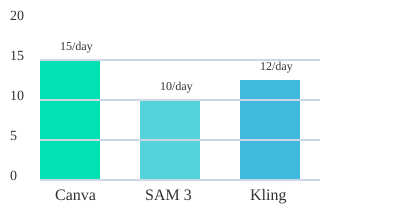
Chart: Free creations per day (approximate, varies by platform and region)
6. Listen Up: AI Voices and Music That Sound (Almost) Too Good to Be True
11 Labs: AI Voice Generation That Breathes, Inflects, and Emotes
Imagine creating a video or presentation without ever recording your own voice—and still having it sound human. That’s the magic of 11 Labs, which has quickly become the gold standard for AI Voice Generation and Text to Speech. The difference? These voices don’t sound robotic. As one user put it,
'The voices don't sound robotic, they actually have like a slight breath to them.'You’ll notice subtle pauses, inflection, and even a hint of emotion. It’s almost eerie how lifelike it gets.
With the free tier, you get 10,000 characters per month—enough for short videos, voiceovers, or playful experiments. Just pick a pre-made voice (like the ever-popular “Adam”), paste in your script, and listen as your words come alive. You might even find yourself double-checking: “Wait, is this really AI?” The realism is wild, especially for faceless creators or anyone who wants to add a professional touch to their content without hiring a voice actor.
Want to take it further? Upgrade, and you can train 11 Labs to clone your own voice. Even a quick training session produces a version that’s recognizably “you”—if a little uncanny. With more in-depth training, the results get even closer to the real thing. It’s a game-changer for podcasters, YouTubers, and anyone exploring the best AI tools for content creation.
Suno: AI Writing Tools Meet Instant Music Creation
Ever wished you could make a song without knowing how to play an instrument, write lyrics, or sing? Suno is here to grant that wish. As one fan said,
'Suno is basically Chat GPT for making songs. You don't need to know how to play an instrument or how to write lyrics or how to sing.'Describe the vibe, pick a genre, and Suno generates a full MP3—melody, vocals, and all—in seconds.
The free tier is generous: 50 credits per day, enough for about 10 songs every day. You can use simple mode (just describe your song) or custom mode (add your own lyrics). The results? Surprisingly catchy. For example, I asked Suno for a pop-punk anthem about subscribing to my channel for the latest AI news. In under a minute, I had a track with fast drums, male vocals, and a chorus that was—honestly—addictive (and a little embarrassing):
Click the button, don't hesitate.
AI news at your front gate, faster than I thought can wait.
Matt Wolf knows the future's fate.
Subscribe to stay ahead, every tool, every thread.
Tomorrow's tech today.
It’s not just a novelty. Suno structures verses and choruses, nails the genre, and delivers a finished song faster than you can hum a tune. For creators, marketers, or anyone who needs background music, it’s a revolution in AI Writing Tools and music generation.
What AI Voices and Melodies Get Right (and Where They Still Get Weird)
- Realism: AI voices now pause, breathe, and emote—perfect for faceless videos or podcasts.
- Speed: Both 11 Labs and Suno deliver results in seconds.
- Free Usage: 11 Labs offers 10,000 characters/month; Suno gives you 10 songs/day—plenty for most casual creators.
- Limitations: Sometimes, voices sound a bit too perfect or melodies feel slightly generic. But for most uses, the line between human and AI is blurring fast.
Whether you’re experimenting with AI Voice Generation for your next video or want to drop an AI-made anthem, today’s Best AI Tools are ready to surprise you—and maybe even outshine your own creative efforts.
7. Into the Third Dimension: Marble and the Arrival of AI-Generated 3D Worlds
Imagine this: what if you could conjure a 3D world just by describing it? No coding, no complex software—just your imagination and a few words. Thanks to Marble from World Labs, this is no longer a hypothetical. With the arrival of AI Technology Advancements like Marble, you can now step into explorable universes built straight from your text prompts. Welcome to the next level of Free AI Tools—where you don’t just see, you enter and interact.
From Flat Images to Living Worlds
Until now, most Best AI Tools focused on generating images or videos. But what if you want to walk around inside your creation? Marble’s free beta lets you do exactly that. Type a prompt—say, “a cozy coffee shop with pixelated croissants”—and Marble generates a fully explorable 3D scene. You can pilot the camera, wander around, and experience your idea from every angle. As one early user put it:
'Marble's allowing us to generate explorable 3D scenes from text prompts. This is like brand new territory here.'
How Marble Works: Your Words, Their Worlds
- Text Prompt: Describe the world you want to see.
- Instant Generation: Marble’s AI builds a 3D scene in seconds.
- Explore: Move the camera, zoom in, and interact with the space.
This shift from static pictures to interactive portals feels almost magical—like having a Holodeck in your browser, one prompt at a time.
Real-World Beta Test: A 3D Coffee Shop
During beta testing, users have already created everything from fantasy forests to city streets. One standout? A 3D coffee shop, complete with pixelated croissants and steaming mugs. You could stroll around the tables, peek behind the counter, and even imagine the aroma of fresh coffee. It’s playful, immersive, and completely free to try right now.
Why This Matters: Creativity, Learning, and Beyond
Marble isn’t just a toy—it’s a powerful tool for creativity and education. Here’s how you might use it:
- Storytelling: Build virtual sets for your next short story or comic.
- EdTech: Let students explore ancient cities or scientific concepts in 3D.
- Prototyping: Sketch out product ideas or architectural spaces quickly.
With Marble, the only limit is your imagination. It’s a leap forward for AI Technology Advancements—and a sign of what’s coming next.
What’s Next? The AI-Augmented Metaverse
As Marble and other Best AI Tools evolve, the line between creator and explorer blurs. Today you’re building coffee shops; tomorrow, you could be crafting entire worlds. The arrival of AI-generated 3D spaces hints at a future where anyone can build, share, and live inside their own digital universes. Are you ready to step through the portal?
8. FAQ: Free AI Tools, Limits, and the ‘Should I Pay?’ Dilemma
Let’s be honest: nothing kills your creative flow faster than hitting a paywall right when you’re in the zone. So, how “free” are the best AI tools, really? And when should you consider opening your wallet? Let’s break down the real-world limits, clever workarounds, and the smart way to mix and match free AI tools for maximum impact.
How ‘Free’ Is Free, Actually?
Most free AI tools use credit systems or monthly quotas. For example, 11 Labs gives you 10,000 characters per month—plenty for short voice projects or testing out different voices (like the popular “Adam” voice you’ve probably heard on YouTube). Suno lets you generate up to 10 songs a day with 50 daily music credits. Whisperflow offers 2,000 words per week for transcription or translation. These limits are generous for casual users, but if you’re working on a big project, you’ll eventually hit a wall.
| AI Tool | Free Tier Limit |
|---|---|
| 11 Labs | 10,000 characters/month |
| Whisperflow | 2,000 words/week |
| Suno | 50 music credits/day |
Quickfire: Which Tools for Whom?
- Students: Try Whisperflow for transcribing lectures, 11 Labs for turning notes into audio, and Suno for creative projects.
- Creators: Mix Suno for music, 11 Labs for voiceovers, and image generators for thumbnails.
- Researchers: Use Whisperflow for interviews, and experiment with AI summarizers or data tools.
What Happens When Your Free Credits Run Out?
When you hit your monthly or daily limit, you’ll usually have to wait for the next cycle, or consider upgrading. Paid plans unlock higher limits and premium features—like training your own voice in 11 Labs or generating longer, more complex songs in Suno. But here’s a pro tip: carefully mixing free tools can stretch your creative output without spending a dime. For example, use Suno for music, then 11 Labs for narration, and a free video editor to bring it all together.
Upgrade Tips and Gotchas
- Check if the paid plan matches your actual needs—don’t pay for features you won’t use.
- Some tools offer student or educator discounts—always look for these before subscribing.
- Be wary of auto-renewals; set reminders to review your subscription before it renews.
Security & Privacy: Should You Trust These New AI Upstarts?
Always read privacy policies before uploading sensitive data. Stick to well-reviewed tools, and avoid sharing personal information unless you trust the platform. The best AI tools are transparent about data use—if it feels sketchy, skip it.
Mixing and Matching: Do You Need One Tool or Ten?
One tool rarely fits all. The real magic happens when you combine the strengths of several free AI tools. You don’t need a fat wallet or a master’s in computer science to unlock AI’s weird and wonderful powers. Experiment, remix, and let your creativity lead the way.
Wild Card: The Future of Free AI Tools
Imagine an AI that recommends the best new free tools every month, tailored to your projects. The landscape is evolving fast—so keep exploring, and don’t be afraid to try something new!
Conclusion: When Magic Meets Routine—Why You Shouldn’t Wait to Experiment with Free AI Tools
There’s a quiet revolution happening right now, and it’s not just in the labs or behind closed doors at tech giants. It’s in your browser, your favorite apps, and even in the tools you can try for free today. The best AI tools of 2025 are already peeking into our daily routines, and the line between work and magic is getting thin. If you’re waiting for a sign to start experimenting, this is it.
Here’s the truth: the most surprising discoveries don’t come from reading manuals or watching endless tutorials. They come from play, from a little bit of desperation when you need to get something done faster, and from the curiosity to see what happens if you just click that button. I’ve learned more from five minutes of hands-on tinkering with free AI tools than from hours of research. There’s no ‘right’ way to start—just start somewhere. The tools are waiting for you to break them, bend them, and combine them in ways no one else has tried yet.
Think about it: just a year ago, the idea of generating a podcast from a PDF, creating a cinematic video from a single sentence, or making a catchy song with zero musical experience sounded like science fiction. Now, with models like Gemini 3 and Nano Banana Pro, this is your new normal. And the best part? You can access these AI tools for free—at least for now. The generosity of these free tiers is almost magical, but as anyone who’s watched the tech world knows, free plans can vanish or shrink overnight. Don’t let the best free tools pass you by—test, break, and enjoy them before they cost an arm and a leg (or disappear entirely).
Here’s my plea: pick three tools from this list and try them this week. Don’t overthink it. Maybe you’ll use Whisperflow to dictate your next email, play with Canva’s Magic Studio to design a post, or create a wild music track with Suno just for fun. You might not get it perfect the first time, but that’s the point. Every little experiment is a step toward understanding how AI can fit into your life—and maybe even change the way you work, create, and solve problems. The only guarantee of staying ahead in the AI revolution is to keep trying new tools, to keep playing, and to keep learning by doing.
‘The line between work and magic is getting thin.’
So, don’t wait for someone to tell you the “right” way to use these best AI tools. Dive in, get your hands dirty, and see what happens. The future is being built by those who experiment today. And who knows? The little bit of play you try now might just prep you for an AI-powered future that’s closer than you think.
TL;DR: You don’t need a fat wallet or a master’s in computer science to unlock AI’s weird and wonderful powers. With a handful of free tools, you can write, design, create, and research faster (and have a little fun, too). Don’t wait to try these—next week they might not be free!
Post a Comment