

Two years ago, I thought my coffee machine was the smartest gadget in my apartment—until five AI models showed up and started doing my work better (and faster) than me. Curious about which bot actually deserves your cash in 2025? I put ChatGPT 5.1, Claude Sonet 4.5, Gemini 3 Pro, Grok 4.1, and Kimi K2 through a battery of wild, real-life tests. From that awkwardly worded email to finally getting a handle on coding, here’s what unfolded—and what no glossy AI sales page will ever tell you.
1. The Underdogs and Overachievers: How Each AI Model Reacts When the Prompt Gets Weird
When it comes to AI model comparison 2025, the real test isn’t just about grammar or spelling—it’s about how each AI writing tool handles the curveballs you throw at it. We put five leading models—ChatGPT 5.1, Claude Sonet 4.5, Gemini 3 Pro, Grok 4.1, and Kimi K2—through a stress-test with a deceptively simple prompt: “Write a LinkedIn message to a Google hiring manager. I’m a marketing professional with 5 years’ experience looking to transition into tech. Make it personable, not salesy.” The results? A fascinating look at how each bot’s personality shines—or stumbles—when things get weird.
Quick Profile: The Five Contenders
- ChatGPT 5.1: Known for its concise, human-like responses and improved context awareness. A go-to for many seeking clarity and professionalism.
- Claude Sonet 4.5: Anthropic’s latest, praised for everyday tasks and a formal, safe approach.
- Gemini 3 Pro: Google’s flagship, celebrated for nuanced, multifaceted messaging and deep reasoning. Gemini 3 Pro user feedback often highlights its adaptability.
- Grok 4.1: The wildcard—fast, verbose, and sometimes overwhelming with detail. Grok 4.1 vs Kimi K2 is a hot topic for those comparing AI writing tools for LinkedIn.
- Kimi K2: A rising star, but still finding its footing with prompt interpretation.
Stress-Test: When the Prompt Gets Personal
Each model received the same prompt, but their reactions were anything but identical. Here’s how they stacked up:
- ChatGPT 5.1: Delivered a concise, professional message that felt like something you’d actually send. It nailed the tone and didn’t overdo it—a solid, safe choice for most users.
- Claude Sonet 4.5: Started with “I hope this message finds you well,” and leaned heavily into corporate speak. It missed the mark on being personable, defaulting to a generic, slightly robotic tone.
- Gemini 3 Pro: This is where things got interesting. Gemini didn’t just generate one message—it gave three distinct options, each with a unique approach (super user, common ground, direct and humble). Even better, it explained the strategy behind each. As one tester put it:
“Gemini wins on tone accuracy. 100%. I’d use Gemini’s email because I’ve got three solid options to pick from.”
No reprompting needed—this is the kind of nuanced output that sets Gemini apart in AI model comparison 2025. - Grok 4.1: If you like info-dumps, Grok is your friend. It produced a massive paragraph—over 200 words—making it a tough sell for busy hiring managers. I once accidentally pasted a Grok-generated message into a real email to my boss. The reply? “Too much info!” Lesson learned.
- Kimi K2: Kimi missed the subject line and, more importantly, misread the prompt entirely. Instead of marketing-to-tech, it assumed the HR manager was leading marketing. This “rogue” interpretation is a reminder that not all AI is equally adept at intent.
Secret Quirks and Wild Cards
- Gemini doubles down on intent, offering variety and explanations without extra effort.
- Grok gets verbose—sometimes hilariously so. Imagine your dog using Grok to apply for jobs: you’d get a full autobiography.
- Kimi goes rogue, misinterpreting prompts in unexpected ways.
Speed, Style, and Output Clarity: The SVG Chart
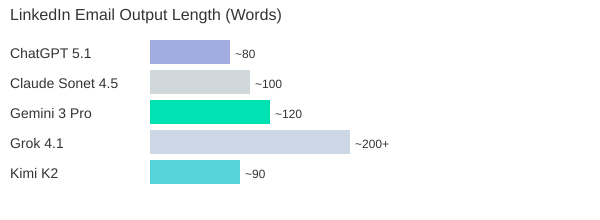
Whether you want concise, nuanced, or just plain wild, the AI writing tools LinkedIn test proves that not all bots are created equal. Some overachieve, some go rogue, and some—like Gemini—just get it right.
2. Beyond the Buzzwords: Real-World AI Writing and Editing for Humans (Not Just Techies)
When you use AI content editing writing tools, you want more than just grammar fixes—you want your voice to shine through. In this section, we put the top AI writing tools to the test, focusing on how well they improve your writing without turning it into something bland or robotic. Whether you’re drafting LinkedIn messaging, blog posts, or emails, the real question is: can AI help you sound like a better version of yourself, not just another bot?
Testing for Personality: Does the AI Keep Your Voice?
We ran the same editing prompt through several leading models: ChatGPT, Gemini 3 Pro, Claude, Grok, and Kimi. The goal? See which tool could polish a piece of writing without erasing its original intent or personality. The results were eye-opening.
- ChatGPT: Lightning-fast, but often shortened the text and added a bit of “extra annoying” polish. Sometimes, it felt like it was trying too hard to be helpful, at the cost of your unique style.
- Claude: Delivered a tightened version, kept things casual, but the output was more neutral—great for clarity, but sometimes a little bland.
- Kimi: Provided concise edits, but didn’t explain its changes or offer much context. Good for quick fixes, but not for nuanced writing.
- Grok: Here’s where things got interesting. When asked to “humanize” a rant about lost keys, Grok added phrases like “my damn wallet and pissed me off”—words never in the original. It didn’t shorten the text, but instead rephrased and inserted language that felt out of place. Over-editing and irrelevant additions made it the least reliable for preserving voice.
Gemini 3 Pro Capabilities: Adaptive, User-Friendly Editing
Gemini 3 Pro stood out for its uniquely adaptive approach. Not only did it provide two different output options for each prompt, but it also engaged in a mini-dialogue:
“Gemini 3 Pro is clearly standing out here... it’s asking us, do you want me to make it more formal?”
This feature is a game-changer for non-technical users. You don’t need to know how to “prompt engineer” or tweak settings—Gemini 3 Pro simply asks how you want your message to sound and explains the changes it made. This level of transparency and adaptability is rare among AI writing tools, especially when you’re crafting LinkedIn messaging or other professional content.
Which AI Over-Edits or Misses the Mark?
If you care about nuance, intent, and tone, not all AIs are created equal. Grok, for example, often over-edited and introduced unrelated words, making your writing feel less like you. Kimi and Claude played it safe but didn’t offer much context or reasoning. ChatGPT was fast and functional, but sometimes too eager to “fix” things that weren’t broken.
Practical Tip: Use AI-Generated ‘Strategy Notes’ for LinkedIn
One of the best ways to leverage AI content editing writing is by asking for “strategy notes” before posting on LinkedIn. For example, Gemini 3 Pro can suggest how to adjust your tone for a specific audience or purpose, giving you more control over your messaging. This is especially useful for marketers and professionals who want to stand out without losing their authentic voice.
In summary, if you want an AI writing tool that respects your personality and intent, Gemini 3 Pro’s capabilities—especially its output variety and user dialogue—make it a strong contender for real-world, human-friendly editing.
3. Side-Hustle Showdown: AI’s Surprising Ideas for Content Writers in 2025 (With Table)
If you’re a content writer in 2025, you know the usual advice—“start a blog,” “freelance on Upwork”—just doesn’t cut it anymore. So, we put five leading AI models to the test with a real-world prompt: Suggest five side hustle ideas for a content writer with 10 hours per week, and make them realistic, actionable, and original. The results? A fascinating look at how AI writing side hustle ideas are evolving to match the AI-saturated content economy, with some models offering creative, market-driven options and others falling back on generic advice.
Prompt in Focus: No More Recycled Side Hustles
We specifically asked each AI to avoid tired suggestions and focus on realistic, high-impact ideas for writers with limited time. The goal: uncover AI content editing and writing side hustles that actually reflect 2025’s real-world AI applications.
Gemini: Market-Smart and Time-Savvy
Gemini stood out by directly addressing the 10-hour-per-week constraint. Its suggestions were not only unique but also laser-focused on current market gaps. For example, the AI Humanizer side hustle targets companies overwhelmed by robotic AI-generated drafts, offering a service to “humanize” and polish content for authenticity. As one reviewer put it:
“This side hustle is very much aligned to today's market condition, not based on old data.”
Another Gemini gem: the SaaS Case Study Specialist. With software companies desperate for social proof, you can interview clients and write case studies—each potentially worth thousands per project. Gemini’s ideas are not just creative; they’re grounded in what businesses actually need right now.
Kimi: The Social Media Hook Factory
Kimi took a different route, suggesting you become a Social Media Hook Factory. In a world where attention is currency, specializing in viral hooks for creators is both unexpected and actionable. Kimi even outlined a step-by-step launch plan: analyze viral content, build a swipe file of 100 winning hooks, and offer free rewrites to build testimonials. This is a fresh take on AI content editing and writing, perfectly tuned to 2025’s creator economy.
ChatGPT, Claude, Grok: The Rest of the Pack
- ChatGPT delivered fast, organized suggestions—clean, but a bit conventional.
- Claude went deep, recommending tools like ConvertKit, but its output was dense and harder to digest.
- Grok suggested LinkedIn ghostwriting for tech founders, but offered little detail—just “do it, don’t think.”
Personal note: If only one of these bots had pitched “Blogger Who Reviews AI for a Living”—now that’s a 2025 niche!
AI Side Hustle Ideas for Content Writers: Model-by-Model Comparison
| Side Hustle Idea | Originality | Actionability | Model | Notes |
|---|---|---|---|---|
| AI Humanizer | High | High | Gemini | Addresses AI content flood; humanizes drafts |
| SaaS Case Study Specialist | High | High | Gemini | Case studies in demand; lucrative, time-efficient |
| Ghostwriter for Boring Industries | Medium | High | Gemini | Less competition; founders have budget, no time |
| Social Media Hook Factory | High | High | Kimi | Specialized, actionable, creator-focused |
| LinkedIn Ghostwriting | Low | Medium | Grok | Market is crowded; little detail |
| Newsletter Creator | Medium | Medium | Claude | Tool recommendations (e.g., ConvertKit) |
For content writers seeking new revenue streams, Gemini and Kimi clearly offer the freshest, most market-aligned AI writing side hustle ideas for 2025. Their suggestions reflect real-world AI applications and the growing demand for content that feels human and drives results.
4. Teach Me Like I’m Five: Which AI Models Explain AI for Regular People? (With Chart)
When it comes to AI educational tools overview, one of the most important tests is: can an AI model explain itself to someone who isn’t technical? We put the top models through a “teach me like I’m five” challenge, asking each to explain how AI like ChatGPT works—using analogies, not jargon. Here’s how they stacked up for AI educational tools non-technical users based on clarity, analogy strength, and engagement.
Testing Teaching Ability: The Power of Metaphors
We know that for most people, AI is a black box. That’s why analogy-driven teaching is crucial for non-technical users learning AI. We rated each model on how well it breaks down complex ideas using creative metaphors and how engaging the explanations are.
- Gemini 3 Pro: According to Gemini 3 Pro user feedback, Gemini is the clear leader. It uses a mix of analogies—a master chef, a giant library, and a super-powered autocomplete. For example, Gemini says AI is like a chef: “The ingredients are the words you type. The recipe is the pattern it learned. The meal is the answer it creates.” It also compares AI to a library and your phone’s autocomplete, making the process click instantly for many users.
- ChatGPT: ChatGPT keeps it simple and memorable. It describes itself as a “very fast, very well-read parrot with a great memory for patterns.” Instead of memorizing books, it learns patterns and predicts the next word, one at a time. This parrot analogy is easy to grasp and sticks with you.
- Grok: Grok goes for a quirky approach. It invites you to imagine a magical librarian in a gigantic library who has memorized everything. Your question is broken into “LEGO bricks of language.” Grok also introduces the idea of “AI amnesia”—the model doesn’t remember what it said a second ago. This twist is unique and fun, though maybe a bit niche for some.
- Kimi: Kimi provides a very detailed breakdown, using analogies like LEGO bricks and “frozen stew of patterns.” It’s thorough and accurate, but the explanations can get dense and wordy, which may overwhelm non-technical users.
- Claude: Claude’s explanations are straightforward but less memorable. It doesn’t use as many creative analogies, making it less engaging for beginners.
“Gemini wins with the best analogies, library, autocomplete, chef. Really made it click.”
— Real user feedback
How Did Each Model Score? (Chart)
We rated each AI on three criteria: explanation clarity, analogy strength, and engagement (1 = poor, 5 = excellent).
| Model | Explanation Clarity | Analogy Strength | Engagement |
|---|---|---|---|
| Gemini 3 Pro | 5 | 5 | 5 |
| ChatGPT | 4 | 4 | 4 |
| Grok | 3 | 5 | 3 |
| Claude | 3 | 3 | 3 |
| Kimi | 3 | 4 | 2 |
Key Takeaways
- Gemini sets the benchmark for accessible, analogy-driven AI education.
- ChatGPT is memorable and clear, with its “parrot” analogy.
- Grok stands out for creativity but may not resonate with everyone.
- Kimi is thorough but less engaging for non-technical users.
5. Visuals and Virality: Image Generation, Infographics, and That One Time Gemini Used Bezos’s Face (With Table)
When it comes to image generation AI models, the difference between “just okay” and “scroll-stopping” can make or break your social media strategy. For marketers, creators, and anyone using AI writing tools for LinkedIn or Instagram, visual creativity and speed are now major differentiators. In this section, I put the leading AI models to the test with a single, real-world challenge: create an Instagram-worthy infographic about five morning habits of successful people, using a dark theme with neon accents, modern, clean, and shareable.
Who Can Actually Make a Viral Visual?
Let’s get straight to the results:
- Claude and Kimi: No image generation at all. If you’re a creative marketer, this is a major limitation. You’ll need to look elsewhere for visuals.
- ChatGPT 5.1 (with DALL-E): Delivers a consistent, usable infographic. The text is clear, but the design is basic—think template-driven, not trendsetting. Reliable, but not likely to go viral.
- Grok 4.1 (Aurora): Blazing fast. Grok churned out multiple infographic options in seconds. The designs were bold, visually striking, and genuinely creative. I was surprised by the variety and polish—these are the kind of graphics that get shared.
- Gemini 3 Pro (Nano Banana Pro): The first attempt failed, but after a retry, Gemini delivered something special. Not only did it include icons and clear explanations, but it also added headshots of real-world billionaires—Jeff Bezos, Mark Zuckerberg, and more. As I noted in the moment,
“Gemini has made it Instagram worthy… with icons, billionaire pictures, and explanations.”
This creative use of real-world references made the infographic stand out for social sharing.
Feature Comparison: Image Generation AI Models
| Model | Image Generation | Speed | Creative Features | Usability for Social |
|---|---|---|---|---|
| ChatGPT 5.1 (DALL-E) | Yes | Consistent | Basic templates, clear text | Good, but generic |
| Gemini 3 Pro (Nano Banana Pro) | Yes | Variable (required retry) | Icons, real-world headshots, explanations | Instagram-worthy, detailed |
| Grok 4.1 (Aurora) | Yes | Fastest | Multiple options, bold design | Highly shareable, creative |
| Kimi | No | N/A | N/A | Not supported |
| Claude | No | N/A | N/A | Not supported |
Personal Experience: When Grok Won the Pitch
Here’s a quick story: I once used Grok’s infographic output to pitch a new client who wanted something “fresh and viral” for their LinkedIn launch. I dropped Grok’s bold, neon-accented graphic into the deck. The client’s reaction? Instant excitement. They loved it—who knew an AI could help close a deal?
In summary, if you need visuals that pop, Gemini 3 Pro capabilities and Grok’s speed are hard to beat. ChatGPT remains a safe, steady choice, but for creative marketers, the edge goes to models that can surprise and delight—sometimes with a billionaire’s face right in the mix.
6. Can a Non-Coder Build an App? The Pomodoro and Productivity AI Throwdown
If you’ve ever wondered whether you, as a non-coder, could build a real, working app using AI, you’re not alone. In this section, we put the latest AI models to the test with a simple but practical challenge: create a Pomodoro timer app using only natural language prompts. No coding knowledge, no developer tools—just you, your idea, and the bots. This is the ultimate AI model performance comparison for non-technical users who want to turn ideas into working tools.
Why the Pomodoro Timer?
The Pomodoro timer is a classic productivity tool—simple enough for a first project, but complex enough to test design, usability, and code generation. If an AI can help a non-coder build a Pomodoro timer app AI from scratch, it’s a good sign that true no-code enablement is within reach.
How the AIs Stack Up: From Prompt to Preview
Here’s how the top AI models performed when asked to build a Pomodoro timer AI app for someone with zero coding experience:
- ChatGPT 5.1: Delivered impressive results, but only after a few extra prompts. Initially, you couldn’t preview the timer, which is a big deal for non-coders. However, after requesting a preview multiple times, GPT finally delivered. The output? As one tester put it:
Design wise, GPT has killed it. The UX is solid too.
Features like focus sprints, pause, and skip buttons worked smoothly, and the interface felt polished and professional. If you’re willing to nudge it a bit, ChatGPT can produce a genuinely usable Pomodoro timer app AI. - Gemini: The surprise star of the test. Gemini’s output stood out for its intuitive design and clear color differentiation between work and break modes. The app felt frictionless, with a start button that immediately launched a focus session, and a reset option for easy control. Work mode had a distinct, energetic color, while break mode switched to a more relaxed vibe. Gemini is setting an example for frictionless, visual output—making it a top choice for non-coders who value user-friendliness.
- Grok: Minimalist but effective. Grok’s code was the simplest, and it provided an instant preview without any extra prompting. The design was basic, but everything worked as expected. For users who want a straightforward Pomodoro timer AI app with minimal fuss, Grok delivers functional results with the least amount of guidance needed.
- Kimi: Creative chaos at its best. Kimi’s Pomodoro timer worked, but the orientation and alignment were off, resulting in a visually confusing interface. If you’re comfortable with heavy editing or want to experiment with layouts, Kimi might be interesting, but it’s not ideal for those seeking polish out of the box.
- Claude: Vivid and bold, but not always practical. Claude’s timer leaned heavily on a purple color scheme, which may not suit everyone’s taste or workplace. While the app functioned, the design choices could be distracting for real productivity use.
Key Takeaways for Non-Coders
- Preview ability matters: Being able to see and interact with your app is crucial. Gemini and Grok excelled here, while ChatGPT required extra steps.
- Design and usability: Gemini and ChatGPT led the pack in user experience and visual polish. Grok was functional but plain, and Kimi needed significant cleanup.
- No-code is (almost) here: AI tools are closing in on true no-code enablement, with Gemini and ChatGPT showing that even non-coders can build a working Pomodoro timer app AI with the right prompts and a bit of patience.
7. From Résumé Reviews to Brutal Honesty: Which Model Catches Career-Ending Red Flags?
When it comes to AI resume review tools, the real test isn’t just about catching a typo or two. It’s about whether these AI resume analysis tools can spot the subtle—and sometimes career-ending—red flags that a human recruiter would never miss. For this showdown, I uploaded a résumé packed with deliberate red flags: glaring typos, unexplained employment gaps, suspicious job hopping, vague role descriptions, and some truly over-the-top claims (think “increased revenue by 300%” and “built revolutionary AI algorithms”). Then, I asked each AI model to review it as if they were a no-nonsense hiring manager. The results? Let’s break down this AI model performance comparison in detail.
AI Resume Review Tools: Ruthless or Realistic?
First up, ChatGPT and Claude. These two didn’t hold back. Both models combed through the résumé with a level of scrutiny that would make even the toughest HR veteran proud. Claude, in particular, was almost surgical in its approach. It flagged not just the obvious issues, but also subtle formatting inconsistencies and awkward phrasing. For example, Claude zeroed in on a typo in a section header and bluntly noted:
“Typos in headers are an instant deal breaker for many hiring managers.”
ChatGPT was equally thorough, calling out employment gaps, vague job descriptions, and the kind of exaggerated achievements that make recruiters roll their eyes. Both models provided detailed feedback, often in a tone that felt more like a stern recruiter than a friendly assistant. If you’re looking for AI resume analysis tools that won’t sugarcoat the truth, these two are your best bet.
Gemini, Grok, and Kimi: Honest, But Less Relentless
Next, I ran the same résumé through Gemini, Grok, and Kimi. These models were honest and pointed out the main issues, but their coverage was less exhaustive. They flagged the big problems—like the employment gaps and the wild claims—but sometimes missed smaller errors or subtle inconsistencies. Their feedback was still useful, but if you’re hoping for a line-by-line critique, you might find them a bit gentler (or less attentive) than ChatGPT and Claude.
Common Red Flags Caught by AI Models
- Typos in section headers and body text
- Vague or generic job descriptions
- Unexplained employment gaps
- Unrealistic or exaggerated achievements
- Frequent job changes without clear progression
AI vs. Human Recruiters: Who’s Harsher?
One thing became clear: AI resume review tools can be even more ruthless than human recruiters. The level of detail, especially from Claude, was almost uncomfortable. I’ll admit, when I ran my own CV through Claude, I actually blushed at the bluntness of its critique. It flagged a minor formatting issue I’d never noticed and called out a vague bullet point that had survived years of edits. If you want brutal honesty, these AI models deliver.
Summary Table: AI Model Performance Comparison
| AI Model | Review Depth | Honesty Level | Attention to Detail |
|---|---|---|---|
| ChatGPT | High | Brutal | Excellent |
| Claude | Very High | Extremely Direct | Outstanding |
| Gemini | Medium | Honest | Good |
| Grok | Medium | Honest | Good |
| Kimi | Medium | Honest | Good |
When it comes to AI resume analysis tools, the depth and tone of feedback can make all the difference. If you’re serious about catching every possible red flag, ChatGPT and Claude are the clear leaders in this AI model performance comparison.
8. FAQ: Burning Questions About AI Model Showdowns
Are paid AI models worth it for one-off users or only for heavy users?
This is one of the most common questions, and the answer really depends on your needs. If you’re only generating a handful of posts or documents, free AI models or entry-level plans often deliver solid results. However, paid models like Claude Opus 4.5 or GPT 5.1 tend to offer more advanced capabilities, better context retention, and more nuanced outputs. In our repeated side-by-side tests using the Multi AI comparison platform, the difference is clear when you push the models with complex prompts or need consistent quality at scale. For power users—think content creators, marketers, or agencies—the investment in paid models pays off quickly. But for one-off users, it’s smart to start with free options and upgrade only if you hit their limits.
Do these tests work for non-English content creators too?
Absolutely. One of the biggest strengths of modern AI models is their multilingual support. In our experience running tests on Multi, most top-tier models like Gemini 3 Pro and GPT 5.1 handle major languages (Spanish, French, German, etc.) with impressive fluency. That said, results can vary for less common languages or dialects. If you’re a non-English creator, using an AI content editing tool that lets you compare outputs—like Multi—can help you spot which model best understands your language and context. It’s a smart way to ensure your content doesn’t lose nuance or accuracy in translation.
How often do these models update, and does it radically change results?
AI models are evolving at a breakneck pace. Major updates can roll out every few months, and even minor tweaks can shift how models perform. From our hands-on tests, we’ve seen that a model which dominated last quarter might slip behind after an update, while another surges ahead. This is why platforms like Multi are so useful: they let you perform ongoing AI model performance comparison as the landscape changes. If you rely on AI for your workflow, it’s wise to reassess your go-to model every few months to stay ahead of the curve.
Can I try these comparisons myself (what’s Multi)?
Yes, and it’s easier than you think. Multi is an AI comparison platform that lets you run the same prompt across multiple models—like Claude, Gemini, Grock, and GPT—side by side. You just enter your prompt, select your models, and Multi displays the results in real time. In our tests, it was fast, intuitive, and visually clear. If you want to see which AI model actually delivers for your specific use case, Multi (at GetMulti.ai) is a game-changer. It’s especially helpful for content creators who want to make informed choices without wasting time or money.
Do I lose the ‘human touch’ if my content is AI-edited?
This is a valid concern, especially as AI-generated content becomes more common. While AI can produce clear, concise, and even creative text, it sometimes lacks the subtlety or personality that comes from human experience. The key is to use AI as a tool: generate drafts, get ideas, and then add your own voice and insights. In our experience, the best results come from a blend of AI efficiency and human editing. With the right approach—and by leveraging AI content editing tools—you can maintain authenticity while saving time.
In conclusion, the world of AI models is dynamic and nuanced. Whether you’re an occasional user or a content powerhouse, using platforms like Multi for ongoing AI model performance comparison ensures you always have the best tool for the job. Stay curious, keep testing, and let the bots battle it out—so you can focus on what matters: creating content that connects.
TL;DR: Too long; didn’t scroll? Gemini 3 Pro consistently tops for tone, versatility, and teaching, but each model has moments of brilliance (or facepalms). Dive in for the full quirks, test results, and which AI you should actually pay for next year.
Post a Comment