

Picture this: It’s a Tuesday night, you’re drowning in quantum mechanics notes, and your mind is about as foggy as a cold window. Been there? Let me introduce you to my new study sidekick—I call it "Gemini, my digital genius." After prodding it with questions that even my teacher dodges, watching it summarize 3-hour lectures in minutes, and making it draw wild infographics so gorgeous they belong on a mug, I've become convinced Gemini 3 isn’t just a tool—it's an academic adventure. Ready to see how? Buckle up!
1. The Secret Sauce: Gemini 3’s Core Features (And Why They’re Not Just Hype)
Unpacking Google Gemini 3 Features: More Than Just Buzzwords
When you hear about the Gemini 3 Pro model, it’s easy to assume it’s just another AI tool. But here’s the truth: Gemini 3 is more powerful than you think, and its core features are designed to make your learning journey smoother, smarter, and way more efficient. Let’s break down what actually sets Gemini 3 apart—and why these aren’t just marketing claims.
Native Multimodal Understanding: The Swiss Army Knife for Learners
Gemini 3’s native multimodal approach means it can handle text, images, video, and even code—all within one model. No more switching between apps or tools. Need to summarize a 2-hour lecture video, analyze a complex diagram, or debug a chunk of Python? Gemini 3 does it all. This seamless integration is a game-changer for students and self-learners who juggle different formats daily.
Deep Think Reasoning Mode: Next-Level Problem Solving
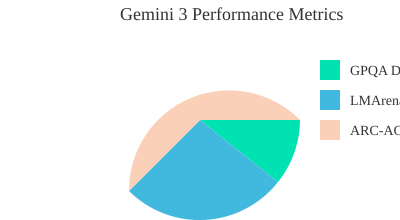
Ever wished your study buddy could actually solve the tough stuff? Enter Deep Think reasoning mode. This feature is built for hard problems—think advanced math, logic puzzles, or code that just won’t run. On the ARC-AGI-2 benchmark, Deep Think scores an impressive 45.1% (with code execution), showing it’s not just smart, but deeply analytical. It’s like having a mini-Einstein on call for your trickiest assignments.
State-of-the-Art Reasoning Performance: The Numbers Don’t Lie
Let’s talk real results. Gemini 3 Pro achieves 1501 Elo on LMArena and demonstrates top-tier performance with 91.9% on GPQA Diamond benchmark, establishing it as a leading AI model for reasoning tasks. These aren’t just numbers—they mean Gemini 3 can handle complex, multi-step reasoning better than almost any other model out there. When you need more than a simple answer, Gemini 3 delivers.
1 Million Token Context Window: Why Size Matters
Imagine uploading your entire semester’s notes, a full codebase, or a marathon lecture series—and having Gemini 3 process it all at once. With a 1 million token context window, you can. This means no more splitting up files or losing context. For real-world learners, it’s a lifesaver when you need to review, summarize, or cross-reference massive amounts of information.
Real-World Impact: From Homework Hacks to Quantum Adventures
Here’s a personal story: The night before a physics exam, I was stuck on the photoelectric effect. My textbook was dense and confusing. I uploaded a diagram and my notes into Gemini 3, and it broke down the concept in plain English, even generating a quick quiz to test my understanding. I finally “got it”—and aced that question the next day.
Wild Card: What Would Einstein Ask Gemini 3?
If Einstein had Gemini 3, he might ask: “Can you simulate the twin paradox with real-time visuals and code?” With Gemini’s native multimodal understanding and Deep Think mode, the answer would probably be yes—and in a way anyone could grasp.
Gemini 3 Tier System: Which Model Is Right for You?
- Pro: Everyday flagship for students and professionals (best balance of power and accessibility).
- Ultra: Enterprise-level, for research or heavy-duty tasks.
- Flash/Nano: Mobile and cost-effective, for on-the-go learning.
- Deep Think: For the hardest problems, especially code and logic.
Hidden Abilities: The Features You’ll Wish You Knew Sooner
- Automated workflows (like CSV dashboards and Gmail automation)
- Deep Research Agent for sourcing and summarizing academic papers
- Multi-speaker audio analysis for group projects or interviews
Feature Wish-List: If I Were in Charge…
- Even smarter citation tools for research papers
- Real-time collaborative whiteboards
- Customizable memory for ongoing projects
2. Gemini 3 in Action: Turning YouTube Lectures into Visual Gold
How to Feed a 3-Hour Physics Video to Gemini 3 Google DeepMind and Get a Summary in Seconds
Ever stared at a 3-hour, 32-minute YouTube lecture on quantum mechanics and thought, “There’s no way I’ll get through this before my next exam”? With Gemini 3’s multimodal understanding capabilities, you don’t have to. Here’s how you can turn any dense video into a goldmine of organized notes and stunning visuals in just a few clicks:
- Open YouTube and pick any lecture or educational video you want to learn from.
- Click the Share button and copy the link.
- Head over to Google Gemini and paste the link into the prompt area.
- Type a simple instruction like “Watch this” and hit Submit.
- Gemini 3 will analyze the video as a temporal stream—not just static frames, but the flow of information over time.
- Within seconds, you’ll get a concise, timestamped summary of the entire video.
This is the power of video understanding temporal stream technology—Gemini 3 Google DeepMind doesn’t just skim; it truly comprehends the structure and content of your videos.
Step-by-Step: Paste, Prompt, and Boom – Instant Organized Notes & Infographics
Once you have your summary, you can take your learning even further. Just prompt Gemini 3 with: “Help me understand this information by making byte-size infographics.” Select Google Gemini Pro for enhanced visuals, and hit submit. In less than a minute, Gemini 3 generates a detailed infographic—complete with clean, attractive visuals that break down complex concepts into digestible pieces.
- Infographics are interactive—click to zoom in and explore details.
- Use the Canvas mode to drag and drop elements, customize layouts, and export your visuals as a PowerPoint (PPT) for presentations or study sessions.
- Perfect for quick reviews or deep dives before exams.
“You can make it your personal study buddy and ask anything to make yourself smarter.”
Gemini 3 vs. Human—Who Really Makes the Better Study Guides?
Let’s be honest: manual note-taking from hours of video is exhausting and time-consuming. On average, it takes a student about 2 hours to create detailed notes from a single hour of video. Gemini 3, with its learn faster multimodal approach, processes the same content in seconds, delivering not just summaries but also visual aids.
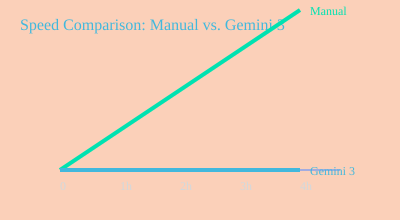
Result: Gemini 3’s multimodal understanding capabilities mean you spend less time taking notes and more time actually learning.
Quirky Scenario: What if Shakespeare Were in Your Study Group?
Imagine Shakespeare sitting in your study group, tossing metaphors about quantum entanglement. Would Gemini 3 keep up? Absolutely. Its multimodal understanding lets it decode not just facts, but also metaphors, analogies, and even jokes—making it the ultimate translator for any learning style.
Tip: Use Gemini’s Canvas Mode for Next-Level Infographics
For subjects like quantum mechanics, where concepts are abstract and interconnected, Gemini’s Canvas mode is a game-changer. Drag, drop, and rearrange infographic elements, then export as PPT for group study or revision. This feature is especially helpful for visual learners and anyone prepping for presentations.
Personal Story: How Gemini Saved My Exam Week When My Brain Checked Out
During finals, I hit a wall with a marathon quantum physics video. My brain was fried. Gemini 3 swooped in—summarized the entire lecture, made infographics, and let me export everything to PowerPoint. I walked into my exam feeling more prepared than ever, all thanks to my “personal study buddy.”
“You can make it your personal study buddy and ask anything to make yourself smarter.”
3. From Infographic to Interactive: Building Real-Life Simulators with a Prompt
Imagine transforming a static infographic or a set of class notes into a fully interactive simulator app—without writing a single line of code. With Gemini 3’s agentic coding capabilities and state-of-the-art reasoning performance, you can now upload images, diagrams, or even hand-drawn sketches and prompt Gemini to build a real-life simulator in under two minutes. This hands-on approach is revolutionizing how students and lifelong learners tackle complex problem solving and understand abstract STEM concepts.
How It Works: From Image Upload to Interactive App
Let’s break down the process:
- Upload Your Source: Start by uploading an image or notes—maybe a diagram you created or one from a resource like Nero Banana. Gemini’s multimodal apps agents can interpret visual content just as easily as text.
- Write a Prompt: Type a simple prompt describing what you want. For example, “Create a real-life simulator app that shows the photoelectric effect.”
- Submit and Watch: Click submit. Instantly, Gemini’s agentic coding capabilities kick in. You’ll see the app being generated live, with the code and interface appearing side-by-side.
- Interact and Explore: Once the simulator is ready, you can interact with it—adjusting variables, running experiments, and visualizing results in real time.
Example: Quantum Experiment Simulator in Minutes
Suppose you want to understand the photoelectric effect—a classic quantum physics experiment. Upload a relevant image, prompt Gemini, and within two minutes, you’ll have a working simulator. As one user put it:
“If you want to understand the photoelectric effect, this has made this kind of photoelectric effect type of app.”
Now, you can adjust sliders for color frequency and intensity, instantly seeing how these changes affect the emission of electrons. No more passive reading—this is active, hands-on learning.
| Feature | Details |
|---|---|
| Simulator Creation Time | <2 minutes from prompt to demo |
| Adjustable Variables | Frequency, Intensity, Position Precision |
| Trigonometry Tools | Cosine, Sine, Probability Sliders |
Real-Time Math Toolkits: Visualizing Trigonometry and Probability
Gemini’s simulators aren’t limited to physics. For math, you can interact with toolkits that let you adjust the cosine and sine functions, visualizing the “circle of cosine and sine” and exploring probability in real time. Move a slider, and immediately see how the graph or probability distribution changes. This immediate feedback is a game-changer for complex problem solving and deep conceptual understanding.
Quantum Uncertainty: Heisenberg Principle, Visualized
Abstract quantum concepts like the Heisenberg uncertainty principle become tangible. Gemini generates an interface where you can adjust the position precision slider and watch how momentum uncertainty responds. This makes the uncertainty principle more than just a formula—it becomes an interactive experience you can manipulate and observe.
Hands-On Learning: Why It Works
Research shows that hands-on, interactive learning leads to better retention and understanding compared to passive reading. Gemini’s approach lets you test ideas, see immediate results, and build intuition for abstract topics. Instead of memorizing, you’re experimenting—turning learning into a personal discovery process.
Practical Joke: Cat Video Physics Demo?
What if you asked Gemini to make a simulator that explains quantum tunneling… with cats? With its agentic coding capabilities and multimodal apps agents, Gemini could generate a playful demo where animated cats “tunnel” through walls. It’s not just fun—it’s a memorable way to learn physics!
Inventions Wish List: What Should Gemini Simulate Next?
- Black hole event horizon visualizations?
- Interactive chemical reaction labs?
- Historical battle simulators for history class?
- Personal finance models for real-world math?
With Gemini’s agentic capabilities, the only limit is your imagination. What will you prompt it to build next?
4. The Hidden Powers: Gemini 3’s Hidden Features That’ll Make You Look Like a Genius
Think you know everything about Gemini 3? Think again. The latest Hidden Gemini 3.0 Pro features are like secret cheat codes for learning, research, and even enterprise-level tasks. Whether you’re a student, a researcher, or a manager, these hidden tools can automate your workflows, analyze meetings, and turn you into the productivity genius everyone envies.
30+ Secret Tools: Unlocking Automated Workflows and More
Gemini 3 isn’t just about answering questions. It’s packed with over 30 hidden features that can supercharge your learning and work:
- Automated Workflows Automation: Set up custom routines for repetitive tasks—think homework reminders, research summaries, or even grading drafts.
- CSV Dashboards: Instantly visualize your data in colorful dashboards, perfect for tracking grades, project progress, or research results.
- Deep Research Agent: Let Gemini dig deep into articles, videos, or even podcasts, then deliver concise, structured summaries with key points and examples.
- Meeting Transcript Analysis: Upload your study group or team meeting audio, and Gemini will transcribe, timestamp, and even identify who said what (and yes, who yawned the most!).
- Multi-Speaker Audio Generation: Create lifelike audio summaries with different voices for each speaker, making reviews and presentations more engaging.
- On-the-Fly PPT Export: Instantly turn summaries, infographics, or dashboards into PowerPoint slides—no manual formatting needed.
- Real-Time Screen Feedback: Share your screen and get live feedback or suggestions as you work through problems or presentations.
- Gmail Automation: Draft, sort, and schedule emails directly from Gemini’s interface.
- Scheduled Task Automation: Set up reminders, recurring to-dos, or even automate entire study routines.
“30+ hidden features include automated workflows, multi-speaker audio generation, video creation, real-time screen sharing, Gmail automation, Deep Research Agent, CSV dashboards, meeting transcript analysis, and scheduled task automation.”
Real-World Power: Enterprise Mission-Critical Workloads
Gemini 3’s hidden powers aren’t just for students. In enterprise settings, these features are transforming how professionals work. For example, Rakuten reported a 50%+ jump in data extraction accuracy using Gemini for meeting transcript analysis and CSV dashboarding. Doctors and researchers use Gemini for faster diagnostics—analyzing MRI and X-ray images, summarizing patient notes, and automating reporting. Managers rely on automated workflows to keep projects on track and teams aligned.
Anecdote: The Study Group Transcription That Changed Everything
Here’s a personal story: I once uploaded a three-hour study group recording into Gemini. Not only did it transcribe every word, but it also broke down the conversation by speaker, highlighted key topics, and even noted who yawned the most (turns out, it was me). The meeting transcript analysis was so detailed, it made reviewing and sharing notes a breeze.
What’s Next? Imagining Wild New Features
With Gemini’s rapid evolution, the future looks even more exciting. Imagine VR study rooms where Gemini moderates discussions, or real-time diagnostics for enterprise mission-critical workloads. The possibilities for automated workflows automation and multi-modal analysis are endless.
Fast Facts: Gemini 3 Hidden Features in Action
- 30+ hidden tools for learning, research, and business automation
- Rakuten: 50%+ improvement in data extraction and transcription accuracy
- 3-hour multi-speaker meeting transcription—speaker identification included
- Available in app, Google AI Studio, Vertex AI, and 3rd-party platforms
Comparison Table: Gemini 3 Feature Tiers and Best Use Cases
| Gemini 3 Tier | Best For | Key Hidden Features |
|---|---|---|
| Standard | Students, Hobbyists | Automated summaries, CSV dashboards, basic workflow automation |
| Pro | Researchers, Educators | Deep Research Agent, multi-speaker audio, on-the-fly PPT export, meeting transcript analysis |
| Enterprise | Doctors, Managers, Analysts | Enterprise mission-critical workloads, advanced diagnostics, real-time screen feedback, scheduled automation |
With these hidden powers, Gemini 3 isn’t just a learning tool—it’s your secret weapon for mastering any challenge, from homework hacks to quantum adventures.
5. Beyond School: Weird and Wonderful Ways to Use Gemini 3
Gemini 3 Ultra premium isn’t just a homework helper—it’s a creative powerhouse that’s transforming how professionals, hobbyists, and creators work and play. With its advanced multimodal capabilities and measurable productivity boosts, Gemini 3 is making waves far beyond the classroom. Let’s explore some of the most unexpected and delightful ways you can use Gemini 3 in your daily life, whether you’re a developer, a brand builder, or just someone who loves a good cat meme.
Not Just for Students: Everyday Magic with Gemini 3
- Recipe Combiner: Ever wondered what you could cook with just the ingredients in your fridge? Gemini 3 can merge handwritten shopping lists, digital recipes, and even voice notes to create a custom meal plan. It’s like having a personal chef who understands your handwriting and your cravings.
- Podcast Note-Taker: Missed an important point in your favorite podcast? Gemini 3’s real-time transcription and summarization features turn audio into structured, searchable notes. Perfect for lifelong learners and podcast junkies alike.
- Creative Writing Assistant: Stuck on your novel or blog post? Gemini 3 can suggest plot twists, refine your Custom Gems brand voice, or even generate poetry based on your mood. Its creative AI uses go far beyond basic grammar checks.
Real-Life Cases: From Notes to Diagnostics
- Merging Handwritten and Digital Notes: Whether you jot ideas on paper or type them on your phone, Gemini 3 supports seamless merging of multimodal notes. Snap a photo of your handwritten notes, upload digital files, and let Gemini 3 organize everything into a structured output—exportable as a PowerPoint or PDF with a single click.
- Analyzing Machine Logs: In enterprise settings, Gemini 3 shines as a tool for machine log analysis and software testing. Developers report a 50% improvement in frontend development quality and structured data extraction compared to Gemini 2.5 Pro. As one user put it:
"Gemini 3 shows 50% improvement over Gemini 2.5 Pro in developer tools and front-end development, with more intuitive interfaces and richer design capabilities."
- Diagnosing MRI Scans: Healthcare professionals use Gemini 3 to analyze MRI scans, combining text, images, and voice notes for faster, more accurate diagnostics. It’s a game-changer for medical teams handling complex cases.
Wildcard: Gemini 3 + Cat Memes = Automated Meme Generator?
Feeling playful? Try feeding Gemini 3 a folder of cat photos and a list of trending meme captions. Its creative side can generate a week’s worth of hilarious, share-ready memes—perfect for social media managers or anyone looking to brighten their day. The combination of advanced image recognition and natural language processing makes Gemini 3 a surprisingly effective meme generator.
Quick Stat: 50% Improvement in Front-End Dev Tools
For developers, Gemini 3 Ultra premium is a productivity booster. Across the Gemini app, AI Studio, and popular IDEs, users see a 50%+ improvement in front-end tools and richer UI components. This means faster legacy code migration, better software testing, and more intuitive design—all with the support of Gemini’s Custom Gems brand voice integration.
Personal Tangent: The Day I Automated My Grocery List
On a whim, I asked Gemini 3 to sort my grocery list by recipe, shelf life, and store aisle. It not only merged my scribbled notes and digital reminders, but also suggested new meal ideas based on what I already had at home. The result? A color-coded, exportable shopping plan that made my next trip both weird and wonderful. I even exported the list as a PowerPoint for fun—because with Gemini 3, even the mundane becomes magical.
From merging notes to generating memes, Gemini 3 Ultra premium is redefining what’s possible—at school, at work, and everywhere in between.
6. FAQ: Your Most Burning Gemini 3 Questions (And a Few You Never Thought Of)
What’s New in Gemini 3? Is It Really That Different?
You might be wondering, what’s new Gemini 3 brings to the table? The biggest leap is its multimodal understanding capabilities. That means Gemini 3 doesn’t just read text—it understands images, videos, audio, code, and even complex data files, all in one place. You can drop in your math homework, a science diagram, or a poem, and it’ll help you make sense of it. Plus, Gemini 3 now offers native visualization tools, so you can turn data into charts or concepts into mind maps instantly.
Can Gemini 3 Really Help With Any Subject—Like, Even Poetry?
Absolutely! Gemini 3’s versatility is one of its standout features. Whether you’re struggling with calculus, analyzing Shakespeare, or need help with creative writing, Gemini 3 is designed to support nearly all subjects. Its multimodal understanding capabilities mean you can upload a photo of a handwritten poem, a PDF of your chemistry notes, or even a video of a science experiment. Gemini 3 can analyze, summarize, and even suggest improvements or creative ideas—yes, even for poetry!
Does Gemini 3 Work on Mobile, or Only Fancy Desktops?
Gemini 3 is built for flexibility. It works seamlessly on both desktop and mobile devices. There’s a dedicated Gemini app for iOS and Android, and you can also access it through your browser or even integrate it into your favorite IDEs or cloud platforms. So whether you’re at your desk, on the bus, or in the library, Gemini 3 is ready to help.
What Are the Privacy Implications of Uploading Notes and Videos?
Privacy is a top concern, especially when you’re uploading sensitive notes, personal videos, or class recordings. Gemini 3 uses enterprise-grade security protocols to protect your data. Files are encrypted during upload and storage, and you control who can access your content. If you’re using Gemini 3 available enterprise solutions, you get extra layers of privacy and compliance, making it safe for schools and businesses. Always check your institution’s privacy guidelines for best practices.
How Does Gemini 3 Compare to ChatGPT or Other AI Helpers?
Great question! While ChatGPT and similar AIs are powerful for text-based tasks, Gemini 3 stands out for its multimodal (all-in-one) use. It’s not just about chatting—you can upload images, audio, code, and more, and Gemini 3 will process them natively. Its visualization tools are built-in, so you can generate graphs, diagrams, or mind maps without switching apps. For students and creators who work with a mix of media and file types, Gemini 3 is a true all-rounder.
Best Hacks for Getting Visuals and Summaries in a Hurry?
- Canvas Mode: Use Gemini 3’s canvas mode to drag and drop files, images, or snippets. It’ll auto-generate visual summaries or mind maps.
- Prompt Engineering: Ask for “summarize this in three bullet points” or “turn this data into a pie chart.” Gemini 3’s prompt flexibility is a huge time-saver.
- Quick Visuals: Upload a photo of your notes and ask Gemini 3 to create a concept map or timeline. It’s perfect for last-minute study sessions.
What’s the Weirdest Thing You’ve Used Gemini 3 For as a Student?
Gemini 3’s creative potential is almost limitless. Real users have shared some quirky use cases, like:
- Turning a doodle into a study infographic.
- Analyzing the rhythm of a song for a music class.
- Generating a “choose your own adventure” story based on biology concepts.
- Creating a meme from a scanned math worksheet (for stress relief, of course!).
“I uploaded a video of my science experiment, and Gemini 3 not only summarized the results but also suggested improvements for next time. It’s like having a lab partner who never sleeps!” — Real Student User
Still Curious? Try Gemini 3’s Multimodal Understanding Capabilities Yourself!
From homework hacks to quantum adventures, Gemini 3 is designed to supercharge your learning—no matter how you study or what you study.
7. Conclusion: The AI Study Partner You Didn’t Know You Needed (Until Now)
If you’ve ever wished for a study partner who never sleeps, never gets tired, and always has the right answer—or at least a clever way to help you find it—then welcome to the new era intelligence with Google Gemini 3. Throughout this walkthrough, you’ve seen how Gemini 3 Pro CLI and its suite of features go far beyond traditional study tactics. Whether you’re wrestling with quantum mechanics, prepping for exams, or just trying to keep your notes organized, Gemini 3 is the AI study buddy you didn’t know you needed—until now.
Let’s reflect on what makes Gemini 3 so transformative. In the past, learning often meant hours spent sifting through dense textbooks, rewatching long videos, or struggling to visualize abstract concepts. Now, with just a prompt or a click, you can instantly summarize a three-hour lecture, generate interactive infographics, or even build a quantum simulator that lets you play with the mysteries of the universe. This isn’t just about saving time; it’s about unlocking a new level of understanding and creativity. As you’ve seen in the examples from Parvez Durani at Gurru Tech Solutions, Gemini 3 Pro CLI empowers you to learn faster, remember more, and approach even the toughest subjects with confidence.
What’s new Gemini brings to the table is the seamless blend of AI and human effort. When you combine your curiosity with Gemini’s capabilities, the result is exponential creativity and deeper understanding. No more burnout from endless note-taking or confusion over complex theories. Instead, you get a supportive, always-on partner that adapts to your needs—whether you’re a visual learner, a hands-on experimenter, or someone who just wants the facts, fast. As one user put it,
"Whether you want instant summaries, interactive infographics, or even a quantum simulator on the fly, Gemini 3 delivers, transforming the way you learn and create—no matter the subject."
And here’s a personal thought: Will AI ever get writer’s block? Probably not. While you might stare at a blank page, Gemini 3 is always ready to generate ideas, structure your notes, or even code up a presentation for you. It’s like having a study buddy who never runs out of energy or inspiration. If you’re ever stuck, Gemini 3 is there to nudge you forward, turning obstacles into opportunities for discovery.
But the real magic happens when you get a little quirky with your AI partner. Don’t be afraid to experiment—ask Gemini 3 to create infographics in your favorite color palette, simulate wild scientific phenomena, or even summarize YouTube videos in the style of your favorite author. And just for fun, imagine if Gemini 3 made a playlist for your study sessions. Would it be filled with lo-fi beats, classical symphonies, or quantum-inspired soundscapes? Maybe it would feature tracks like “Data Dreams,” “Algorithmic Flow,” or “Quantum Leap”—the perfect soundtrack for your next academic adventure.
The key takeaway is simple: curiosity plus AI is the new superpower for students and creators. Gemini 3 doesn’t just lighten your workload; it opens doors to new ways of thinking, learning, and expressing yourself. Sometimes, it’s okay to let your ‘study buddy’ do the heavy lifting—especially when that buddy is powered by the latest in new era intelligence.
So, why not try Gemini 3 in your own unique way? Dive into its features, test its limits, and see how it can reshape your learning journey. Whether you’re condensing notes, building simulations, or just looking for a smarter way to study, Gemini 3 Pro CLI is ready to help you unlock your full potential. The future of learning is here—and it’s more creative, interactive, and supportive than ever before.
TL;DR: If you've ever wished for a study partner who's never tired, never stumped, and kind of a show-off, Gemini 3 is your go-to. Whether you want instant summaries, interactive infographics, or even a quantum simulator on the fly, Gemini 3 delivers, transforming the way you learn and create—no matter the subject.
Post a Comment